Free tools Windows power users keep installed
One-click scans. No signup required.
For most gaming builds, the RTX 4080 16GB is the better buy: it is typically around 20–25% faster in rasterized games in controlled comparisons, performs better in ray tracing, supports DLSS 3 Frame Generation, and draws less power. The RTX 3090 Ti is the more specialized choice when a workload genuinely needs 24GB of VRAM or when a tested, warrantied card costs substantially less.
This comparison covers the released 16GB RTX 4080, not the announced-but-cancelled 12GB model. NVIDIA later used the RTX 4070 Ti name for that 12GB configuration. NVIDIA’s announcement explains the original configurations.
RTX 4080 vs RTX 3090 Ti at a glance
| What matters | RTX 4080 16GB | RTX 3090 Ti |
|---|---|---|
| Best fit | Gaming, ray tracing, efficiency | Workloads that need 24GB VRAM |
| Gaming performance | Typically faster; TechSpot measured a 25% lead at 1440p and 22% at 4K in its 13-game test | Still capable at 1440p and 4K |
| VRAM | 16GB GDDR6X | 24GB GDDR6X |
| Rated board power | 320W | 450W |
| Key feature difference | Ada architecture; DLSS 3 Frame Generation; AV1 hardware encoding | More memory and wider memory bus |
| Launch US MSRP | $1,199 | $1,999 |
The TechSpot performance figures are averages from its specific 13-game test, not a promise for every game or system. The launch prices are historical, not guidance on what either card should cost now. TechSpot’s test and methodology provide the benchmark context.
Specification comparison
| Specification | RTX 4080 16GB | RTX 3090 Ti |
|---|---|---|
| Architecture | Ada Lovelace | Ampere |
| GPU die | AD103 | GA102 |
| Process | TSMC 4N | Samsung 8N |
| CUDA cores | 9,728 | 10,752 |
| RT cores | 3rd generation | 2nd generation |
| Tensor cores | 4th generation | 3rd generation |
| Base clock | 2,205 MHz | 1,560 MHz |
| Reference boost clock | About 2,505 MHz | About 1,860 MHz |
| Memory | 16GB GDDR6X, 22.4Gbps | 24GB GDDR6X, 21Gbps |
| Memory bus | 256-bit | 384-bit |
| Memory bandwidth | 716.8GB/s | 1,008GB/s |
| L2 cache | 64MB | 6MB |
| Interface | PCIe 4.0 x16 | PCIe 4.0 x16 |
| Rated board power | 320W | 450W |
| Launch date | November 16, 2022 | March 29, 2022 |
Reference specifications are summarized from NVIDIA’s RTX 4080 family page and RTX 3090 family page. Partner cards can differ in clock speeds, power limits, dimensions, cooling and connectors, so check the exact model before buying. Those official product pages do not establish a single set of dimensions or slot thickness for all partner cards.
The Tool Desk
Outbyte Driver Updater FREEScan for outdated or missing drivers - takes under a minuteDriver Scan →Outbyte PC Repair FREERepair Windows errors before they cause bigger problemsFix Now →#1 Best Overall

- All-aluminum metal material - Provides strong and long-lasting support. This is made of all-aluminum metal instead of plastic, can avoid the aging of plastic materials and can be used as a long-term replacement.
- Screw adjustment design - The graphics card bracket design can be compatible with various chassis configurations of traditional and long power supply bays to meet various user hosts.
- Bottom hidden mag.net design - The mag.net hidden in the base is designed for easy installation and more stable standing in the chassis.
- The workmanship of the detail process - The small graphics card support frame is made of three complex processes: polished anode, sandblasted anode and CNC high-speed edge-washing high-gloss process. The full anode process can maintain the durability.
- Tool-free fixing module - The support module is equipped with a cushioning anti-scratch pad and a base high-gloss process.
Why fewer CUDA cores can still be faster
The RTX 3090 Ti has more CUDA cores and greater theoretical memory bandwidth, but those figures do not determine cross-generation performance on their own. The RTX 4080 combines higher clocks, newer core generations, a much larger L2 cache and architectural improvements. Comparing CUDA-core counts as if each core did the same work across generations gives a misleading result.
Gaming performance at 1440p and 4K
1440p
In TechSpot’s 13-game rasterized average, the RTX 4080 was 25% ahead at 1440p. The practical difference depends on whether the game is GPU-limited: at high frame rates, an older or midrange CPU can cap performance and narrow the gap. The 4080’s lead matters most in demanding games, high settings and systems with a CPU capable of feeding the GPU.
4K
TechSpot measured a 22% RTX 4080 lead in its 4K average. At this resolution, games are more often GPU-limited, making the difference easier to realize. Both cards can run demanding 4K games, however, so a working 3090 Ti is not automatically worth replacing if it already meets your frame-rate target.
When benchmark averages will not match your PC
Results vary with game engine, settings, driver version, CPU, factory overclock and features such as DLSS. PassMark’s G3D Mark comparison showed the RTX 4080 about 15% ahead based on submitted synthetic benchmark results; that is an aggregate synthetic measure, not a controlled gaming test. PassMark’s comparison page is useful as another data point, not a substitute for game-specific results.
Ray tracing, DLSS and video features
The RTX 4080’s newer RT and Tensor cores make it the stronger option for ray-traced gaming, and it supports DLSS 3 Frame Generation. In TechSpot’s tested ray-tracing scenarios, its 4K lead over the 3090 Ti ranged from roughly 19% to 47%, depending on the game and configuration; TechSpot reported a 26% lead in Cyberpunk 2077 with RT and DLSS enabled, and 46% in Dying Light 2.
Rank #2
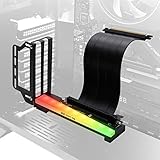
- Vertical GPU Bracket with RGB LED effects, Synchronizable RGB lighting via motherboard (AURA, Mystic, Fusion):Support M/B 3 pin RGB Header (5V, D, G), Please note : Not Support 4pin RGB header (+12V, G,R,B), 12 volts can destroy LED.
- Vertically display a GPU graphics card, Compatible with most brand's Graphic card, show off the visual design of the GPU and its cooler.
- Designed for most ATX case with at least 7 PCIE slots in the market
- The 20cm/7.8in PCIE riser with high quality TPE cable and sectional design allows air ventilation and lowers working temperatures for better overall system performance.
- With movable bracket, More flexible in using PC case interior space. NOTE: Please check your case with enough space
The RTX 3090 Ti supports ray tracing and DLSS Super Resolution, but not Ada’s Frame Generation feature. Frame Generation creates additional displayed frames rather than rendering every frame in the traditional way. It can make supported games feel smoother, but generated frames do not equal the same increase in native-rendered frames; latency, artifacts, base frame rate and game support all matter. NVIDIA’s launch claims were specific to supported workloads and demonstrations, not a universal head-to-head multiplier. See NVIDIA’s RTX 40 announcement and its neural-rendering announcement.
The RTX 4080 also adds AV1 hardware encoding, which can matter for video creation and streaming workflows that support the format. Check the software and platform you use to confirm whether that capability benefits your specific workflow.
VRAM: when the 3090 Ti’s 24GB matters
The RTX 3090 Ti’s 24GB capacity is its clearest advantage over the 4080’s 16GB. More memory can be decisive when a scene, model or project exceeds 16GB; it does not make the GPU faster when that capacity is unused.
- Consider the 3090 Ti for large Blender scenes, local AI models, high-resolution textures, certain scientific workloads, or other projects you know exceed 16GB.
- The 4080 is generally the better gaming choice when your games and settings fit within 16GB. That is generally enough for most current gaming workloads, though unusually large texture packs and future titles can change the requirement.
- Check actual memory pressure rather than relying on an application’s allocation figure alone. Look for stutter, asset pop-in, reduced texture quality, minimum-frame-rate drops or out-of-memory errors.
NVIDIA lists the memory configurations on its RTX 4080 family page and RTX 3090 family page. Whether 24GB is worth a slower, less efficient card depends on the application and project size, not simply the fact that the number is larger.
Power, cooling and build compatibility
| Power measure | RTX 4080 | RTX 3090 Ti |
|---|---|---|
| Rated board power | 320W | 450W |
| NVIDIA average gaming power measurement | 251W | 398W |
NVIDIA reports those average gaming figures under its own test methodology; they are not guaranteed readings for every game or card. In that comparison, the RTX 4080 used 147W less on average. Its lower power draw can mean less heat in the room, less cooling demand and better performance per watt. NVIDIA’s power-efficiency article explains the test context.
Rank #3

- PCIe 4.0 Riser Cable Works seamlessly with PCIe 4.0 and 5.0 motherboards and GPUs, delivering fast, reliable performance in gaming or creative tasks.
- Fits Standard ATX Cases Designed to handle modern 3-slot GPUs while fitting seamlessly into most traditional 7-slot ATX cases.
- Removable M-ATX Bracket Bracket can be removed to fit seamlessly into most traditional 4-slot Micro-ATX cases. Note: May block rear fan in some cases.
- Toolless, Adjustable Easily adjusts up to 65mm horizontally and 30mm toward the side panel—no tools needed.
- Flexible Installation Allows the GPU to be installed after the holder is secured in your preferred position.
PSU and power leads
Do not treat a PSU recommendation as a universal guarantee. The CPU, PSU quality and age, partner-card power limit, and the rest of the system affect what is suitable. NVIDIA’s 40-series guidance includes system-power and connector details at its support page. A 750W or 850W supply may suit some RTX 4080 systems; a 3090 Ti’s 450W board rating often calls for more PSU headroom, particularly alongside a power-hungry CPU.
Both generations may use a 12VHPWR-style connection or adapter, depending on the card. NVIDIA’s RTX 3090 Ti user guide specifies multiple PCIe power leads for its adapter. Follow the exact card and PSU instructions: fully seat the connector, avoid a sharp bend immediately beside it, and use separate PSU cables where the adapter requires them.
Do these 3 things before closing this tab:
1Fix the driver behind crashes, sound loss and screen glitches2Repair Windows errors before they cause bigger problems3Scan for outdated or missing drivers - takes under a minuteCase clearance
Many cards in both families are large and heavy, but dimensions differ by partner model. Before purchase, compare the specific card’s length, height and slot thickness with the case; also account for front-radiator clearance, side-panel and connector-bend space, airflow and any support-bracket requirement. Do not assume a reference card’s measurements apply to a partner model.
Independent reader supportYour contribution helps us test, update, and keep practical guides available for everyone.Price: launch MSRP is not a current-value guide
| GPU | US launch MSRP | Launch timing |
|---|---|---|
| RTX 3090 Ti | $1,999 | March 29, 2022 |
| RTX 4080 16GB | $1,199 | November 16, 2022 |
NVIDIA announced the RTX 3090 Ti at its $1,999 launch price; the 4080’s launch announcement listed $1,199. Those are historical US MSRPs, not what a buyer should pay today.
PassMark’s comparison page displayed approximately $1,500 for the RTX 4080 and $2,000 for the RTX 3090 Ti as of August 2026. Treat these as indicative benchmark-site price data only: the page does not establish whether those listings are new, used, refurbished, in stock or representative of a particular region. Check a real checkout price before deciding. PassMark’s dated comparison is the source for that signal.
Rank #4

- [Esports-grade Materials] Constructed from high-quality aluminum alloy, the acer GPU support bracket features an anodized finish that ensures durability and resistance to rust. It provides lasting support for your graphics card, stable and durable for long-lasting use.
- [Ajustment Freely] The detachable design features precise 0.5mm increments for easy height adjustment, allowing for a perfect fit in various cases and simpler installation. With a large diameter of 14.7mm, it surpasses the thickness of other GPU supports. acer GPU sag bracket offers maximum load capacity, providing reliable support for your graphics car.
- [Powerful Magnetic Design] The top and bottom are equipped with thoughtful silicone pads to prevent damage to the graphics card. The strong magnet at the bottom ensures that the support is firmly 'welded' to the chassis, serving as a double safety guard for the graphics card.
- [Easy installation] Tool-free hand-tightening design allows for height calibration in just 30 seconds, making it easy to get started. The spiral support rod, combined with the fixing ring, helps you find the perfect height, allowing your graphics card to achieve the optimal angle.
- [Confident Purchase] Your purchase is backed by an 18+18-month warranty. For a truly seamless experience, our support team is ready to assist and will answer any inquiry within 18 hours.
For an older GPU, compare the actual card and sale terms, not just the model name:
- New, refurbished or used condition, plus seller and warranty.
- Return period, shipping, tax and whether the card is actually in stock.
- Exact partner model, dimensions and included power adapter.
- For the 3090 Ti, the cost of any PSU, cooling or repair work, as well as electricity use over time.
At equal prices, the RTX 4080 is the stronger gaming purchase. A substantially cheaper 3090 Ti can make sense when you need its memory capacity and can verify the card’s condition.
Which card should you choose?
Choose the RTX 4080 if gaming is the priority
- You want higher rasterized performance in the cited game-test averages.
- Ray tracing or DLSS 3 Frame Generation matters to you.
- You want lower rated power and easier thermal management.
- The 4080’s price is close to or below the 3090 Ti’s and the card comes with suitable warranty coverage.
Choose the RTX 3090 Ti if you need 24GB
- Your measured creator, AI or compute workload regularly exceeds 16GB.
- The card is materially cheaper than a suitable 4080 and has a satisfactory condition, return policy and warranty situation.
- Your system can handle its power draw, cooling and physical size.
If you already own a 3090 Ti
Keep it if it meets your frame-rate and workload needs. Moving to a 4080 brings a meaningful gaming and efficiency improvement, but the TechSpot rasterized averages describe a moderate generational step, not a reason by themselves to pay a large upgrade cost. The switch is easier to justify if you also value ray tracing, Frame Generation, lower power use, or a new card with better warranty coverage.
If you are buying used
For a 3090 Ti, ask for sustained-load testing rather than a single benchmark score. Check VRAM temperatures, fan noise, stability, display outputs, visible damage or repairs, adapter condition, warranty transferability and return terms. GDDR6X memory temperature is worth particular attention. A low price can cease to be a bargain if the card needs repairs, replacement fans, thermal work or a stronger PSU.
Bottom line
For gaming, choose the RTX 4080 16GB when its price and condition compare favorably: it is faster in the cited game testing, stronger in ray tracing, newer in features and substantially more power-efficient. Choose a 3090 Ti when you can use its 24GB of VRAM and the specific card is cheap enough, reliable enough and compatible with your build. If you already have a 3090 Ti and it does the job, keeping it is often the sensible upgrade decision.
Recommended Free Tools
Quick Recap
Product prices and availability are accurate as of the date/time indicated and are subject to change. Any price and availability information displayed on Amazon at the time of purchase will apply.