To earn a Mastery Point in Space Marine 2, use the weapon variant you want to master during completed Operations missions. You can also spend matching Armoury Data to master an unlocked variant immediately. These routes award a point for the variant; weapon-family XP is a separate progression track used to unlock higher weapon tiers.
Earn a Mastery Point by using the weapon in Operations
- Choose the weapon variant you want to master. Keep it equipped for the Operations run.
- Use it during the mission. Simply carrying or equipping a weapon without using it is not the documented way to advance its mastery.
- Complete the mission. Operations weapon XP contributes to progression for both the weapon family and the individual variant. Variant mastery awards a Mastery Point.
The full weapon XP allocation formula has not been published in the recent guide covering weapon XP and Mastery Points. That means there is no supported exact XP target, kill count, or guaranteed fastest mission to cite.
Use Armoury Data for an immediate mastery shortcut
If the variant is unlocked, you can spend matching Armoury Data to master it immediately and receive its Mastery Point. This saves the Operations progression for that variant, but it does not replace the weapon-family progression needed to unlock higher tiers. Armoury Data can therefore be more valuable when you are saving it for tier unlocks.
Use the shortcut when you want the perk point for a particular unlocked variant now and are willing to spend its matching data; otherwise, progress it through Operations by using it in completed missions. Focus Entertainment also documents Armoury Data refinement in its Patch Notes 6.0.
#1 Best Overall

- Embody the superhuman skill and brutality of a Space Marine. Unleash deadly abilities and devastating weaponry to obliterate the relentless Tyranid swarms. Defend the Imperium in spectacular third-person action in solo or co-op modes.
- Purge the relentless Tyranid swarms as legendary Space Marine Titus in a spectacular new campaign. Play solo or with up to 2 friends in 3 player co-op.
- Enjoy intense, gory and fast-paced third-person action with hundreds of enemies on screen, from the creators of blockbuster co-op shooter World War Z.
- Standard edition includes: Base game, Macragge’s Chosen DLC, with 3 unique cosmetics for your Bolt Rifle, Chainsword & Power Armour
Keep variant mastery separate from weapon-family progression
There are two related tracks to keep straight. The weapon family’s XP progression contributes toward unlocking further tiers, while mastery for an individual variant grants a point to spend in the perk tree for that weapon type. Progressing one should not be mistaken for completing the other. Gamer Guides’ Operations leveling guide describes this distinction and the Armoury Data shortcut.
Check fully upgraded weapons for the Patch 6.0 bonus
Focus Entertainment’s Patch 6.0 notes state: “When a weapon is fully upgraded, the player is now awarded an additional mastery point (works retroactively).” If you return to an older save with fully upgraded weapons, check them for the extra point.
Rank #2

- Easy to use
- Value for money
- Durable & Design
Spend the point in the corresponding perk tree
A Mastery Point unlocks a perk in the perk tree for its weapon type. Decide which variant you want to progress before spending Armoury Data or taking it into Operations, especially if you are balancing immediate access to a perk against saving data for weapon-tier unlocks.
Quick Recap
Rank #4

- Miniatures Box Set
Rank #3
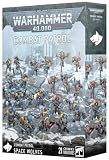
- Askar’s Wolfpack is a group of ferocious Fenrisians led by Fyrri Askar, a Wolf Guard Battle Leader. He takes charge of 10 impulsive Blood Claws, 5 Wolf Guard Terminators and 5 Bestial Wulfen.
- Box also contains a Space Wolves transfer sheet with 419 decals.
- These mini figures are unpainted and needs to be assembled. We recommend using Citadel Plastic Glue and Citadel Paints.
Product prices and availability are accurate as of the date/time indicated and are subject to change. Any price and availability information displayed on Amazon at the time of purchase will apply.
Free tools Windows power users keep installed
One-click scans. No signup required.




