The Tool Desk
Outbyte Driver Updater FREEScan for outdated or missing drivers - takes under a minuteDriver Scan →Outbyte PC Repair FREEClear out junk files and repair common Windows errorsFree Scan →sun_show.dll is an application DLL used by ONBON’s LedshowTW LED-display programming software. If Windows says sun_show.dll is missing, not found, or could not be loaded, repair the LedshowTW installation rather than copying a random DLL into a Windows system folder.
The file normally belongs in the program’s Res directory, commonly:
As an Amazon Associate I earn from qualifying purchases.
C:Program Files (x86)ONBONLedshowTW 2017Res
Your installation may use a different drive, folder, or LedshowTW release.
What sun_show.dll is and where it belongs
ONBON’s LedshowTW manuals list sun_show.dll among the software’s sun_*.dll modules inside the Res folder. It is not a Windows component, Microsoft runtime, DirectX file, or ordinary hardware driver.
#1 Best Overall

- ✅【Widly Application】Neon light switch used to control single color LED strip lights, works great with our 12V neon signs, led counter lights, strip light, cabinet light, puck lights etc.
- ✅【Easy to Use】Neon sign dimmer switch replacement comes with 23 key remote control, with dynamic modes. Smooth and reliable dimming from 10% to 100%, you can adjust the brightness level to fit any space.
- ✅【Remote Control Dimmer】On / off switch separated,1 to 1 remote paired, Remote distance: 10M at open area.
- ✅【Memory/Timer Function】The neon sign dimmer replacement has a power-off memory function, which can remember the last set lighting mode when you turn it on next time. With the timer function,you can set the time(5 /10/ 30 /60 Minutes) to delay the shutdown.
- ✅【Package Included】1 x LED Remote Control, Power by 2 x AAA batteries (not included), 1 x Dimmer, 1 x User Manual
Public documentation confirms LedshowTW distributions associated with the 2011, 2012, and 2017 product generations. That does not establish one universal DLL version for every release. Do not mix a DLL from one generation with an executable or companion files from another.
| Question | Safe answer |
|---|---|
| What uses it? | ONBON LedshowTW LED-display programming software |
| Is it part of Windows? | No |
| Normal location | The LedshowTW installation folder, usually Ressun_show.dll |
| Architecture | Public evidence points toward a 32-bit application, but every release is not fully documented |
| Correct source | The complete matching LedshowTW package from ONBON |
| Should it be registered? | Normally no |
The exact error may look like one of these:
- “The program can’t start because sun_show.dll is missing from your computer.”
- “The specified module could not be found.”
- “Error loading sun_show.dll.”
- “The code execution cannot proceed because sun_show.dll was not found.”
- “sun_show.dll is either not designed to run on Windows or it contains an error.”
A “specified module could not be found” message can also mean that sun_show.dll exists but one of its dependent files is missing. That is why replacing only the named file often fails.
Fix 1: Repair or reinstall the matching LedshowTW package
This is the most reliable repair for a missing or damaged sun_show.dll.
Recommended Free Tools
1. Back up your LED programs
Before uninstalling anything, close LedshowTW and copy your user-created LED-display projects to another folder, USB drive, or external backup location. Do not assume an uninstall will preserve every project file.
2. Check the existing installation
- Press Windows key + E to open File Explorer.
- Browse to the folder where LedshowTW is installed.
- Open the
Resfolder. - Look for
sun_show.dll.
Also check which executable you are launching. It may be named:
LedshowTW.exe
LedshowTW2011.exe
Do not move sun_show.dll out of Res. If the file is present but the program still reports it as missing, the problem may be a dependent DLL, damaged companion files, or a mismatched executable.
3. Try Windows repair first
Some traditional desktop programs expose a repair option.
- Press Windows key + R.
- Type
appwiz.cpland press Enter. - Select the LedshowTW entry.
- Choose Repair or Change, if available.
- Follow the wizard and restart Windows.
On Windows 11, you can also check:
- Open Settings.
- Select Apps.
- Select Installed apps.
- Find LedshowTW.
- Open its menu and choose Advanced options, if shown.
- Select Repair, if available.
Windows does not offer repair controls for every traditional application. If no repair option appears, continue with a clean reinstall.
Rank #2
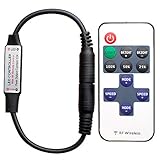
- 【Control LED Single】Can be used to control LED single color strip lights
- 【Working Voltage】Voltage: DC 5-24V ,Output Current: 6A
- 【Easy to operate】Very easy to operate, Comes with 11 key Remote Control
- 【Speed and brightness adjustable】Smooth Dimmer Effect. Speed and brightness adjustable
- 【1-to-1 RF Pairing】Supports 1-to-1 remote pairing and autosave function. To change the pairing frequency, turn off the remote, then press “SPEED-” and “SPEED+” within 5 seconds; the LED light will flash to confirm the frequency change.
4. Reinstall one complete ONBON release
- In Settings > Apps > Installed apps, select LedshowTW and choose Uninstall.
On older Windows installations, use Control Panel > Programs and Features. - Restart the computer after uninstalling.
- Download the LedshowTW release that matches the affected installation from ONBON’s official LedshowTW download page.
- Use the complete ZIP package or installer supplied by ONBON, not a standalone DLL.
- Extract the package to a normal local folder if necessary.
- Run the installer and allow it to recreate the full program directory.
- Restart Windows again.
- Launch the same LedshowTW executable that previously failed.
The installation should restore the Res folder and its companion modules together. If the installer offers a destination folder, avoid installing over a partially copied folder from another LedshowTW generation.
How to tell whether this worked
Open LedshowTW and load a test project. The missing-DLL dialog should no longer appear, and the program should reach its normal editing interface.
If the same error returns immediately, check whether:
- the new installation contains
Ressun_show.dll; - Windows Security removed the file again;
- you installed a different LedshowTW generation;
- the error names a different missing DLL;
- the executable is launching from an old shortcut pointing to a deleted folder.
Fix 2: Check Microsoft Defender quarantine
Antivirus software may remove or quarantine an application file. Do not restore a file automatically just because its name is sun_show.dll.
- Open Windows Security from the Start menu.
- Select Virus & threat protection.
- Select Protection history.
- Review detections around the time LedshowTW stopped starting.
- Open a detection that refers to the LedshowTW installation.
- Verify the file path and detection name.
- Restore or allow the file only when the original installation came from a trusted ONBON package and the detection has been verified as a false positive.
Microsoft warns that restoring a genuine threat can put the computer at risk. If you are uncertain, leave the file quarantined, remove the damaged installation, run a scan, and reinstall LedshowTW from the official source.
After restoring a verified file, reinstalling the complete application is still preferable because quarantine may have removed companion files.
Fix 3: Remove mixed or wrong-version files
A common repair-shop mistake is replacing one DLL inside an old application folder while leaving the rest of the program from another release.
This can happen when someone:
- copies
sun_show.dllfrom another computer; - installs LedshowTW 2017 over a 2011 or 2012 folder;
- restores only the
Resdirectory from a backup; - launches an old desktop shortcut after reinstalling;
- moves the program folder manually to another drive.
The fix is to remove the damaged installation and install one complete LedshowTW package. Do not combine files from the 2011, 2012, and 2017 distributions.
Rank #3

- Customizable Brightness & Dynamic Modes : Take full control of your lighting with 23 keys to adjust brightness from 10% to 100% smoothly. Choose from dynamic flashing modes to create the perfect ambiance—whether for lively parties or relaxing evenings.
- Wide Compatibility : Works with a variety of low-voltage DC 12-24V single-color LED lights, including neon signs, LED strip lights, cabinet lights, puck lights, and shelf lighting. A versatile solution for home or commercial use. Remote distance: 10M at open area. 1 to 1 remote paired.
- Timer & Memory Function : Set the shutdown delay from 5 to 60 minutes with the built-in timer function—ideal for bedtime or energy saving. The memory function automatically restores your last used lighting mode when powered on again.
- DC Connectors for Easy Installation : Comes with DC female connectors for flexible and hassle-free installation. If your neon sign or light strip is fixed in place, simply connect the wires to the included connector and enjoy full dimming control.
- Package Included : 1 x LED Remote Control (batteries not included, 2 x AAA required), 1 x Dimmer Receiver, 1 x User Manual
The same rule applies to architecture. Public evidence points toward a 32-bit LedshowTW application, and the documented 2017 path is under Program Files (x86), but the architecture of every release is not fully established. Use the architecture and package supplied for your exact LedshowTW release. Do not copy an x64 DLL into a 32-bit application folder.
Fix 4: Determine whether a dependency is actually missing
If sun_show.dll is physically present but Windows reports “The specified module could not be found,” another DLL required by it or by the program may be absent.
First, perform the complete LedshowTW reinstall above. That restores the known companion files without guessing.
Do these 3 things before closing this tab:
1Scan for outdated or missing drivers - takes under a minute2Repair Windows errors before they cause bigger problems3Fix the driver behind crashes, sound loss and screen glitchesIf the problem continues, record:
- the full error text;
- the exact executable name;
- the complete installation path;
- whether
sun_show.dllexists; - whether the entire
Resfolder exists; - the Windows version;
- any Defender detection name.
A dependency-analysis utility can help a technician diagnose which imported module is missing, but it should be used for diagnosis, not to download replacement files from unverified sources.
Visual C++ runtime warning
Do not install a Microsoft Visual C++ Redistributable merely because the filename ends in .dll. Install an official Microsoft x86 or x64 runtime only when the error specifically names a runtime such as msvcp*.dll or vcruntime*.dll, or when ONBON support identifies that requirement.
sun_show.dll itself is not evidence that a Visual C++ runtime is missing.
Fix 5: Repair Windows components only when Windows is also malfunctioning
sun_show.dll is not a protected Windows system file, so SFC and DISM will not normally recreate it. They are secondary steps for a computer with broader Windows corruption, failed updates, or installation failures.
Quick wins for a faster PC:
Clear out junk files and repair common Windows errorsFree Scan →Fix the driver behind crashes, sound loss and screen glitchesFind Drivers →Run DISM
- Open Start.
- Type Command Prompt.
- Right-click Command Prompt.
- Select Run as administrator.
- Approve the User Account Control prompt.
- Run:
DISM.exe /Online /Cleanup-Image /RestoreHealth
Wait for it to finish. Then restart Windows.
Run System File Checker
Open an elevated Command Prompt again and run:
sfc /scannow
Wait until verification reaches 100 percent. Restart the computer and test LedshowTW.
Rank #4

- 【UPGRADE GAME ROOM TO THE NEXT LEVEL!】Easily make your gaming cave the most epic entertainment center with this stunning gamepad shaped neon sign that instantly transforms your space and radiates joy. It makes the perfect addition to your gaming decor and brings a cool touch of color that will SURELY make your gamer buddies envious.
- 【PLUG AND PLAY】Mounted on a high quality clear backboard with pre-drilled holes (STICK HOOK NOT INCLUDED), it's super easy to install and move around. Simply hang the neon gamer sign on a wall and plug in - you are READY to go for the game play with the magical glow vibes.
- 【AWESOME GAMER DECOR & GIFT】Add the neon gaming sign as the perfect decoration to match your video game consoles and show off your style as a hardcore gamer. It also makes an ideal gift for Birthday, Christmas and other occasions - GREAT gifts for gamers and tech lovers.
- 【SAFE & DURABLE】Quiet and noise-free, the LED neon tubes do not heat up and are safe to touch. Powered by a USB cord (5.9ft/1.8m), each gamer led sign is handmade and built to last at least 50,000 hours (POWER ADAPTOR NOT INCLUDED).
- 【SATISFACTION GUARANTEED】Kavaas promises every customer a happy shopping experience with us. For any questions, please feel free to contact us and we will work hard to make everything RIGHT for you!
These commands repair Windows components and protected system files. They do not replace the need to reinstall the ONBON application when its Res folder is incomplete.
Repeating SFC and DISM without knowing what changed can waste time. Outbyte PC Repair can scan for broader Windows problems and show what needs attention; its repair function is handled by the full version. Reinstalling LedshowTW remains the definitive fix when the missing file belongs to that application.
Also install pending updates:
- Open Settings.
- Select Windows Update.
- Select Check for updates.
- Install available updates.
- Restart Windows.
Fix 6: Update drivers only when the symptoms point to hardware communication
A display-controller driver problem can prevent LedshowTW from communicating with LED hardware, but it is not the normal explanation for a missing sun_show.dll message. Repair the application first.
What’s actually slowing this PC down?
Pick the symptom - the matching free tool is one click away.
If LedshowTW opens but fails when communicating with the controller:
- Right-click Start.
- Select Device Manager.
- Expand categories such as Ports (COM & LPT), Universal Serial Bus controllers, or the device category supplied with your LED controller.
- Right-click the relevant device.
- Select Update driver.
- Choose Search automatically for drivers.
- Restart Windows and test the controller again.
If the device has a warning icon, uninstalling it and reconnecting the hardware can allow Windows to reinstall it. Record the device name before making changes.
Hunting through several hardware-driver versions is separate from restoring sun_show.dll. Outbyte Driver Updater can scan for outdated drivers and identify what needs updating; the driver installation is completed by the full version. It is not a substitute for reinstalling LedshowTW.
What not to do
Do not copy the file to System32 or SysWOW64
Windows normally searches the application directory before system directories. The correct location is the LedshowTW installation, especially its Res folder. Copying the file into C:WindowsSystem32 or C:WindowsSysWOW64 can hide the real problem and create version conflicts.
Do not use random DLL download sites
A loose download may contain malware, the wrong release, the wrong architecture, or an incomplete set of companion files. It may also leave the underlying LedshowTW installation damaged. Use the complete package from ONBON instead.
Do not run regsvr32 on this file
regsvr32 is for self-registering COM or OLE DLLs that provide a DllRegisterServer function. It is not a general-purpose DLL repair command, and there is no public evidence that sun_show.dll is a self-registering component.
Do not whitelist an unverified replacement
If Defender detects a file, verify its origin and detection before restoring or excluding it. A correct filename does not prove that the file is safe.
Best Value

- ✔【Plenty of function】This product comes with 23 key can remotely adjust the brightness and speed of the light. More than that, dynamic flashing mode and delay shutdown fuction are also provided.
- ✔【Application scenarios】This product is suitable for various low-voltage DC12-24V LED monochrome light strips, neon light strips, cabinet lights, puck lights etc, with a wide range of application.
- ✔【Remote】Remote distance: 10M at open area. 1 to 1 remote paired.
- ✔【Power】Power by 2*AAA batteries(not included)
- ✔【Package Included】 1*Remote Control, 1*Dimmer
When to contact ONBON
Contact ONBON support if a complete matching reinstall still fails. Provide the full dialog text, LedshowTW executable name, installation path, Windows version, Defender detection details, and whether Ressun_show.dll exists.
PC Slower Than It Used to Be?
A free scan shows the junk files, broken settings and background clutter dragging Windows down - then fixes them in one click.Free scan · Windows 10 & 11Crashes, No Sound, or Screen Glitches?
Random freezes, missing sound and display glitches usually trace back to one bad driver. Find and replace yours safely.Free scan · under a minuteAlso mention whether the problem began after reinstalling Windows, antivirus quarantine, cleanup software, an interrupted update, or moving the program folder. ONBON lists [email protected] on its LedshowTW download materials.
FAQ
Is sun_show.dll a Windows file?
No. It is associated with ONBON’s LedshowTW application and normally belongs in that program’s Res directory.
Can I download only sun_show.dll?
That is not the safe repair. Install the complete matching LedshowTW package from ONBON so the executable, Res folder, and companion DLLs remain compatible.
Should I register sun_show.dll with regsvr32?
Normally no. Registering it is inappropriate unless the vendor specifically confirms that the file is a self-registering COM/OLE component.
Free tools Windows power users keep installed
One-click scans. No signup required.
Why does Windows say the module is missing when the file exists?
The named file may depend on another missing or incompatible DLL. A mixed installation, damaged Res folder, or wrong architecture can produce the same loader message.
Is LedshowTW 32-bit or 64-bit?
Public evidence points toward a 32-bit application, including the documented Program Files (x86) installation path. The exact architecture of every LedshowTW release is not fully documented, so use the matching vendor package rather than guessing.
Will DISM or SFC restore sun_show.dll?
No. They repair Windows components and protected system files. They may help an installation fail for broader Windows reasons, but reinstalling LedshowTW restores this application file.
Quick Recap
Product prices and availability are accurate as of the date/time indicated and are subject to change. Any price and availability information displayed on Amazon at the time of purchase will apply.
The Tool Desk
Outbyte PC Repair FREEClear out junk files and repair common Windows errorsFree Scan →Outbyte Driver Updater FREEScan for outdated or missing drivers - takes under a minuteDriver Scan →



