
PC Slower Than It Used to Be?
A free scan shows the junk files, broken settings and background clutter dragging Windows down - then fixes them in one click.Free scan · Windows 10 & 11Outdated Drivers Are Slowing You Down
One free scan finds every outdated or missing driver and matches the right update for your exact hardware.Free scan · exact hardware matchFor most buyers, the Ducky One 2 Mini is the safest traditional 60% mechanical keyboard choice from the 2023 shortlist. Competitive gamers should look at the Razer Huntsman Mini, wireless and Mac users at the Keychron K12, and shoppers wanting a mainstream balance of gaming features and customization at the HyperX Alloy Origins 60. The Royal Kludge RK61 is the budget wireless option, while the Corsair K65 RGB Mini and Mountain Everest 60 are worthwhile ecosystem and feature-rich alternatives.
There is one important catch: a 60% keyboard normally removes the dedicated number pad, function row, navigation cluster, and arrow keys. Those commands are accessed through Fn-layer combinations instead. That smaller footprint can leave more room for a mouse, but it is not automatically faster or better for every player or typist.
Disclosure: This guide may contain qualifying product links. Prices, stock, revisions, switch options, and regional layouts can change, so verify the exact model before buying.
As an Amazon Associate I earn from qualifying purchases.
The Tool Desk
Outbyte Driver Updater FREEFix the driver behind crashes, sound loss and screen glitchesFind Drivers →Outbyte PC Repair FREEClear out junk files and repair common Windows errorsFree Scan →What a 60% keyboard actually is
A 60% keyboard is a compact alphanumeric layout rather than a precise universal key count. Most examples have 61 keys and retain the main letter, number, modifier, and punctuation keys while omitting several dedicated sections:
- the number pad;
- the function row from F1 through F12;
- the separate navigation cluster, including keys such as Insert, Delete, Home, End, Page Up, and Page Down; and
- the dedicated arrow keys.
The missing commands usually remain available through an Fn layer. For example, an arrow or function key may be produced by holding Fn and pressing another key, but the exact mapping differs between keyboards. Check the manual or configuration software for the model and revision you are considering. Popular Mechanics’ explanation of the 60% format is also useful for visualizing the space and usability trade-off.
#1 Best Overall

- High-Performance Hall Effect Magnetic Switch Keyboard: The AULA Win60 HE 60% keyboard features advanced, self-developed magnetic switches and a lightweight, non-memory-intensive driver, delivering polling rates of up to 8000Hz for ultra-fast response times. As a hall effect keyboard, it leverages cutting-edge magnetic technology to ensure precise and consistent actuation without physical contact, eliminating wear and tear associated with traditional mechanical switches. This level of performance gives you a competitive edge in gaming with unmatched precision and reliability
- Optimized for FPS Games: Designed for FPS titles like Valorant and CS2, the Win60 HE’s magnetic switches enable faster peeking and quick-stop shooting, enhancing accuracy and positioning. Experience a clear advantage in high-stakes moments with this gaming keyboard
- Rapid Trigger Gaming Keyboard: Featuring an ultra-low RT step distance of just 0.02mm, the Win60 HE ensures lightning-fast response times, perfect for rapid shooting and complex combos. Stay ahead in intense matches with unmatched speed and precision
- Compact 60% Design: With its space-saving 60% layout small keyboard, the Win60 HE is ideal for gaming, work, or travel. Its compact size saves desk space without sacrificing functionality, making it perfect for gamers and typists alike
- Dynamic RGB Lighting: The Win60 HE features a lower light position design that illuminates PBT keycaps, along with 16.8 million customizable RGB colors. Create stunning lighting effects to match your setup and elevate your gaming atmosphere
This design is attractive to gamers who want a small travel footprint and more mouse space, especially when using a low-sensitivity mouse setting. It is less attractive if you regularly use arrow keys, F-keys, Delete, Home, End, a number pad, or spreadsheet shortcuts. A 65% keyboard is a different category: it generally adds dedicated arrow keys and often a compact navigation column. Do not assume a 65% board is a 60% board simply because both are smaller than a full-size keyboard.
Our 2023 picks at a glance
The 2023 buying guides did not agree on one universal winner. Keebnews selected the Ducky One 2 Mini as its overall/value choice, while Expert Reviews divided its recommendations by use case and Dexerto favored the Mountain Everest 60 for gaming. That disagreement makes sense: a wired gaming board, a wireless Mac keyboard, and a budget Bluetooth model are solving different problems.
Recommended Free Tools
| Category | Recommended model | Why it fits | Main caveat |
|---|---|---|---|
| Best traditional all-rounder | Ducky One 2 Mini | Established compact mechanical design, RGB, PBT keycaps, USB-C, and broad switch appeal | Older model family; revision, layout, switch, and stock details vary |
| Best for gaming speed features | Razer Huntsman Mini | Optical switches, 1000 Hz polling, per-key RGB, programmable keys, and onboard profiles | Wired only; optical switches use a different ecosystem from conventional MX-style switches |
| Best mainstream balance | HyperX Alloy Origins 60 | Recognizable gaming brand with useful customization extras | Less flexible than enthusiast hot-swap boards, depending on the revision |
| Best wireless and Mac/Windows option | Keychron K12 | Bluetooth, USB-C wired mode, multi-device support, Mac and Windows compatibility, and optional hot-swap sockets | Wireless polling is listed at 90 Hz; it is better suited to general use than top-level competitive play |
| Best budget wireless path | Royal Kludge RK61 | Low-cost 61-key layout with Bluetooth and wired connectivity in many listings | Features differ substantially by version and seller |
| Best brand-ecosystem alternative | Corsair K65 RGB Mini | 60% layout, Cherry MX options, per-key RGB, and Corsair ecosystem integration | Price and feature mix may be less compelling than enthusiast-oriented alternatives |
| Best premium modular alternative | Mountain Everest 60 | Gaming-focused modularity and premium features | A niche choice rather than a universal recommendation |
Best traditional all-rounder: Ducky One 2 Mini
The Ducky One 2 Mini is the most defensible conventional recommendation if you want a recognizable wired 60% mechanical gaming keyboard without chasing an especially unusual feature set. Keebnews ranked it its best overall 60% keyboard for 2023, citing its features, build quality, connectivity, and switch selection.
The One 2 Mini family is associated with Cherry MX switches, RGB lighting, PBT double-shot keycaps, and USB-C. Those details make it a well-rounded starting point for someone who wants a compact board for gaming and ordinary desktop use. PBT keycaps are generally chosen for their resistance to developing a glossy worn surface, while double-shot legends are designed to remain part of the keycap rather than being printed on top.
Do not treat every One 2 Mini listing as identical. It is an older model family, and regional layouts, switch choices, revisions, included accessories, and availability can differ. Confirm the exact SKU before buying rather than assuming that a listing has the same connector, keycaps, or Cherry MX variant as another One 2 Mini listing.
Best for gaming speed features: Razer Huntsman Mini
The Razer Huntsman Mini is the strongest gaming-first pick when you specifically want Razer’s optical switch platform and a feature set built around competitive play. Razer describes it as a 60% optical gaming keyboard with individually backlit RGB keys, N-key rollover, fully programmable keys, onboard profiles, detachable USB-C, and 1000 Hz polling. Its launch material also identifies an aluminum construction, doubleshot PBT keycaps, a standard bottom row, and clicky or linear optical switch options. Razer’s product announcement has the relevant specifications.
Quick wins for a faster PC:
Repair Windows errors before they cause bigger problemsFix Now →Fix the driver behind crashes, sound loss and screen glitchesFind Drivers →Clear out junk files and repair common Windows errorsFree Scan →Optical actuation is a feature-positioning reason to consider this model, not proof that it is the objectively fastest keyboard in every game. Actual performance depends on the switch version, settings, game, computer, USB connection, and player. The standard Huntsman Mini should also be distinguished from the later Huntsman Mini Analog and Huntsman V3 Pro Mini; the names are similar, but they are not the same product.
The other trade-off is switch compatibility. If you want to experiment with the broad MX-style mechanical switch market, a conventional hot-swappable keyboard may be more flexible. The Huntsman Mini makes more sense when you value Razer’s optical switch feel, programmable controls, RGB software, and onboard profiles over universal switch interchangeability.
Rank #2
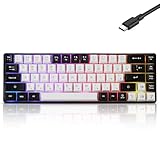
- This wired gaming keyboard featured with dust-proof, conflict-free,rainbow backlit, plug and play, 68 keys design, easy to clean, wide compatible with devices like pc, mac, laptop, computer which support windows series system or Android, Linux, IOS, PS4,PS5,etc, system.
- Professional Mechanical feeling Keys, 68 keys compact gaming keyboard, equipped with a long USB cable, can be easily plug and play, mini size, compact, save space, maximum to utilize your extra desk space, easy to carry or use whenever or wherever you are, perfect for home, work or on the go.
- all 68 keys are no conflict, allow multiple keys to work simultaneously with high speed for a reliable connection, have 10 multimedia keyboard, great for gamer, typist, programmer, writer etc.
- pressing the switch makes loud click sound, crisp paragraph feeling, excellent input feeling, strong mechanical feeling and long service life, providing precise tactile feedback for typing and gaming.
- stylish layout, double-shot injection non-slip suspension keycap, splash-proof design, durable panel enough to protect it from scratch, also firm kickstand feet adjustable typing angle.
Best mainstream balance: HyperX Alloy Origins 60
The HyperX Alloy Origins 60 occupies the middle ground between a basic compact gaming keyboard and a more enthusiast-oriented custom board. Expert Reviews named it the best mid-range 60% keyboard in its July 2023 roundup, and Tom’s Hardware also covered it as a compact mechanical gaming keyboard.
HyperX includes a keycap puller, an additional Esc key, and an alternate spacebar design. Those extras make the keyboard easier to personalize immediately, without requiring a separate accessory purchase. It is a sensible choice for a player who wants a familiar gaming brand, mechanical switches, compact dimensions, and some visual customization without starting with a bare-bones enthusiast kit.
The Alloy Origins 60 should be described as a strong balance of gaming features and customization rather than as a guaranteed winner for typing feel, acoustics, or durability. Those qualities depend on the exact switch and personal preference, and the available research does not establish a universal advantage in those areas. Check the individual revision if hot-swap support or a particular switch type is important to you.
Best wireless and Mac/Windows keyboard: Keychron K12
The Keychron K12 is the most versatile choice here for a laptop-based desk, a multi-device setup, or a user who moves between macOS and Windows. It uses a 61-key 60% layout and supports Bluetooth as well as wired USB-C operation. Keychron lists compatibility with Windows, macOS, iOS, and Android, connection to up to three devices, Bluetooth 5.1, and a 4000 mAh battery. RGB variants and hot-swappable versions are available, but those are configuration choices rather than universal K12 specifications. Check Keychron’s K12 specifications before choosing a particular version.
Mac support is a practical advantage. The K12 includes Mac and Windows keycap legends and layouts, so you do not have to mentally translate every modifier key when switching operating systems. Its hot-swappable versions support MX-style three-pin and five-pin mechanical switches, allowing switch changes without soldering, subject to the compatibility of the exact PCB and switch.
There is a gaming caveat. Keychron lists wired polling up to 1000 Hz but wireless polling at 90 Hz. That does not make Bluetooth unusable for casual gaming, but it makes the K12 primarily a productivity and general-use wireless keyboard rather than the first choice for a player optimizing every part of a competitive setup. It also has a taller, more conventional keyboard profile than some low-profile wireless boards, so factor in desk height and wrist position.
Free tools Windows power users keep installed
One-click scans. No signup required.
Best compact Bluetooth enthusiast option: Anne Pro 2
The Anne Pro 2 remained a notable compact Bluetooth option in 2023-oriented buying guides, including Keebnews. It is worth considering if programmable mechanical features and a small wireless board are more important to you than buying the newest model family.
Availability is the main reason to approach it cautiously. The research for this guide did not locate a stable current official product specification page confirming a universal US configuration. Treat the Anne Pro 2 as a historically relevant 2023 option and verify the exact revision, seller, battery claims, switch type, software support, and layout before ordering.
Rank #3

- Compact 60% Gaming Layout & Portability: Maximize desk space with a streamlined ANSI design; Ideal for gaming setups and on-the-go use; Foldable feet provide ergonomic tilt for extended comfort
- Ultra-Responsive Linear Red Switches: Smooth, low-resistance switches with 45g actuation; Optimized for rapid keystrokes in gaming and typing; 50 million keystroke durability for long-term reliability
- Customizable LED Backlighting & Durability: 15 dynamic lighting modes with adjustable brightness/speed; Double-shot keycaps resist fading and ensure backlight visibility; Anti-ghosting supports 61-key rollover for competitive play
- Detachable USB-C & Universal Compatibility: Reversible USB-C cable for easy storage and replacement; Plug-and-play setup for Windows, Linux, and macOS; Sleek white finish enhances any workspace aesthetic
Best budget wireless path: Royal Kludge RK61
The Royal Kludge RK61 is a practical entry point for shoppers who want to spend less on a compact wireless mechanical keyboard. 2023 buying coverage described versions with Bluetooth and wired USB connectivity, a 61-key layout, and red, brown, or blue switch options. Keebnews included the RK61 among its budget-oriented recommendations.
Royal Kludge uses overlapping RK61 names across different listings, so the model name alone is not enough to establish the feature set. Battery capacity, hot-swap support, switch compatibility, wireless behavior, keycap legends, and even included accessories can be SKU-dependent. Treat claims from a marketplace listing as claims about that specific version, not every RK61 keyboard.
Choose red switches if you prefer a smooth linear press, brown switches if you want a tactile bump without a deliberate click, or blue switches if you want an audible click and clicky feel. None of these is inherently the best choice; they are different preference categories.
Best recognizable gaming-brand alternative: Corsair K65 RGB Mini
The Corsair K65 RGB Mini is a sensible alternative for buyers already using Corsair peripherals or who want a well-known gaming-brand ecosystem. Corsair identifies it as a 60% mechanical keyboard, and its launch material describes Cherry MX mechanical switches and per-key RGB lighting. Corsair’s product page identifies the K65 RGB Mini range.
This model is less about offering the most enthusiast-friendly customization and more about fitting a compact keyboard into an existing Corsair setup. Compare the current price and software requirements with the Ducky, HyperX, and Razer options before choosing it solely for brand familiarity.
Best feature-rich gaming alternative: Mountain Everest 60
Consider the Mountain Everest 60 if modularity and premium gaming-oriented features matter more than having the simplest recommendation. Dexerto selected it as its best 60% mechanical keyboard in a 2023 gaming roundup. It is a niche alternative for players who want a more feature-rich design, not a universal winner for every 60% buyer.
Do these 3 things before closing this tab:
1Scan for outdated or missing drivers - takes under a minute2Clear out junk files and repair common Windows errors3Fix the driver behind crashes, sound loss and screen glitchesThe reason to choose it is its gaming-focused modular approach. The reason not to choose it is that those added features may not matter if you simply want a small wired board with dependable switches and minimal software. Compare the exact configuration and current availability before paying a premium.
How to choose the right 60% keyboard
1. Decide whether you can live without dedicated keys
This is the most important decision and the one many shopping lists understate. A 60% board can be excellent for gaming while being irritating for work if you regularly use the arrow cluster, function keys, navigation commands, or number pad.
Rank #4

- 🌟【60% Keyboard: 61 Keys Compact Design】Ultra-compact layout with 61 keys that free up your desktop, leaving more space for mouse movements. Especially,there is a long detachable Type-C cable on the right side of the keyboard, ensuring safe transport in your travel bag. For FPS gamers who are focused on speed & secure connection,this 60% keyboard is proper to pick.( 💙Simply Press Fn+Space key to switch to direction keys for efficient operates)
- 🌟【Mechanical keyboard: Responsive Blue Switches】CACKBIRD gaming keyboard features blue mechanical keys that give a satisfyingly "click" sound and tactile resistance with each keystroke, so you can be confident with every move you make.This keyboard is more comfortable to type on since it features deeper key travel,greater feedback,and more space between keys.Great for gamers, office workers, copywriters, programmers and editors.( 💙 Include a keycaps puller for cleaning or other needs.)
- 🌟【Rainbow LED Backlit Accompanies Your Night】18 LED Rainbow Backlight Effects,5 brightness levels & speeds,1 customization mode.Exchange lighting mode for every mood and environment--making your gaming experience one-of-a-kind.Moreover,this gaming keyboard features double injection ABS engineered keycaps that bring crystal clear uniform backlight to greatly improve your typing accuracy at night.
- 🌟【Ergonomic Design & Full keys Anti-ghosting】All keys can work simultaneously,thus you can fully enjoy your game without program errors.Our Keyboard with the scientific stair-up keycaps design and stable foldable kickstands brings maximum comfort,keeping your hand in the most natural state to minimize hand fatigue after longtime use and help you minimize typos.
- 🌟【Strong Compatibility】Plug and play,no drivers or software required.Work perfectly for Windows 10/8/7/XP, Mac OS, and Windows VISTA.
Before buying, test the keyboard’s Fn layer in a layout diagram or manual. Ask yourself:
- Can I comfortably use the arrow-key combinations?
- Will I need F-keys for games, development tools, or editing software?
- Do I frequently use Delete, Home, End, Page Up, or Page Down?
- Do I enter numbers often enough to need a number pad?
- Will I remember the secondary locations, or would remapping be necessary?
If the answer to several questions is no, a 65%, tenkeyless, or full-size keyboard may be a better fit even if it uses more desk space.
2. Pick the switch by feel and sound
- Linear: a smooth, uninterrupted press, often preferred by players who do not want a tactile bump.
- Tactile: a noticeable bump during the press, providing physical feedback without the deliberate click of a clicky switch.
- Clicky: a tactile press with an audible click. It can be satisfying but may disturb nearby people or be unsuitable for microphones.
Switch labels are not a ranking of quality. The same switch category can feel different depending on spring weight, keycap profile, stabilizers, lubrication, and the keyboard’s construction. If you cannot try the board first, prioritize a return policy and avoid assuming that a popular switch will suit you.
3. Choose wired or wireless based on the use case
Wired is generally the safer choice for competitive gaming because it avoids battery management and wireless connection variables. The Razer Huntsman Mini, Ducky One 2 Mini, HyperX Alloy Origins 60, Corsair K65 RGB Mini, and many Mountain configurations are aimed primarily at a wired desk setup.
Wireless is more convenient for laptops, multi-device desks, and living-room use. The Keychron K12 can connect to up to three devices and also offers wired USB-C operation. The RK61 and Anne Pro 2 are compact wireless paths, but their exact wireless features and availability require more careful SKU checking.
4. Check hot-swap support carefully
Hot-swappable sockets let you replace switches without soldering, which is useful if you are still discovering your preferred feel or want to repair a failed switch. However, hot-swap is not a guarantee of universal compatibility.
Confirm all of the following:
- the exact keyboard revision has hot-swap sockets;
- the sockets accept the switch pin arrangement you want, such as three-pin or five-pin MX-style switches;
- the switch housing and PCB do not interfere with each other; and
- the replacement switches are compatible with the board’s stabilizers and key layout.
The Keychron K12 is available in optional hot-swappable versions. Do not infer the same capability for every Ducky One 2 Mini, RK61, HyperX, or other board simply from the product family name.
5. Inspect the keycaps and bottom row
PBT keycaps are a useful durability and feel feature, while double-shot legends can be preferable to surface printing. The Ducky One 2 Mini and Razer Huntsman Mini are notable here because the research identifies PBT keycaps for both.
Best Value

- Mini portable 60% compact layout: MK-BOX is a 68 keys mechanical keyboard have cute small size, but with separate arrow keys and F1-F12, Fn function keys you need, can use it for gaming or work while saving space.
- Mechanical red switch: characterized for being linear and smoother, slight key sound has no paragraph sense with minimal resistance, but fast action without a tactile bump feel which makes it easier to tap the keyboard.
- Classic charming blue LED backlit: Customize multiple illuminated LED light effects, supports about 16 backlight modes, press Fn + Ins can control it, FN + ←/→ control backlight speed, FN + ↑/↓ control backlight brightness.
- Full anti-ghosting keyboard: all 68 keys are no conflict, black grey red mash up design, ergonomic suspension double-color injection keycap, double kickstand feet adjustable typing angle and detachable usb cable, both practical and beautiful.
- Extensive compatibility: MageGee MK-Box mechanical keyboards use USB 2.0 connector making it compatible with Windows (2000, XP, ME, Vista, 7, 8), Linux and Mac, plug and play, no drivers or software required.
Aftermarket keycap compatibility is determined by more than the keyboard’s percentage label. Check the keycap profile, stem type, modifier widths, spacebar size, and bottom-row dimensions. A standard bottom row makes replacement shopping easier, but it still does not guarantee that every keycap set will fit.
6. Treat software and remapping as core features
A good configuration tool can make a 60% keyboard much easier to live with. Look for the ability to remap secondary keys, create layers, assign macros, save profiles, and configure lighting. Razer explicitly lists fully programmable keys and onboard profiles on the Huntsman Mini. Other boards may use different software, firmware, or onboard shortcuts.
What’s actually slowing this PC down?
Pick the symptom - the matching free tool is one click away.
Do not assume that a keyboard can remap every key just because it has RGB lighting. If you need a custom arrow layer, a dedicated Delete key, or game-specific macros, confirm that the exact model and operating system support those functions.
Independent reader supportYour contribution helps us test, update, and keep practical guides available for everyone.Useful accessories and maintenance
Accessories are worthwhile when they solve a specific problem rather than simply adding to the shopping list. A compatible 60% keycap set can change the feel and appearance, replacement switches can repair or tune a hot-swappable board, and a detachable USB-C cable can make a wired desk easier to route. A switch or keycap puller is useful for maintenance, while a keyboard case helps if you regularly carry the board between home and gaming setups.
If you customize a board, check the layout before ordering hot-swappable keyboard switches or a 60% keycap set. The socket type, switch pins, keycap stem, spacebar width, stabilizers, and bottom row all matter. A coiled USB-C cable is only appropriate when the keyboard actually uses a detachable USB-C connection; verify the connector and cable orientation rather than buying by appearance alone.
Troubleshooting a 60% keyboard that is not detected
- Check the physical connection. Try another USB port and a known-good data cable. Some cables provide power but do not carry data.
- Check the operating mode. If the keyboard supports Bluetooth and wired operation, confirm that it is switched to the intended mode and reconnect it through the operating system’s Bluetooth settings.
- Test outside the game. Check whether the keyboard works in a text editor or at the login screen. If it works elsewhere, the issue may be the game’s key bindings or permissions rather than the keyboard.
- Use the manufacturer’s support materials. Check the correct firmware, configuration utility, reset procedure, and driver guidance for the exact model and revision.
- Only then investigate Windows peripheral drivers. Microsoft’s built-in device tools and the keyboard manufacturer’s official downloads should be the first choices. An optional third-party tool such as Windows keyboard driver troubleshooting may identify outdated or missing peripheral drivers, but it is not required to use a 60% keyboard and should not replace basic cable, Bluetooth, firmware, or support checks.
Do not flash firmware intended for a different revision simply because the product name looks similar. This is especially important for older or seller-dependent families such as the Ducky One 2 Mini and RK61.
What not to assume from a 2023 buying guide
- Smaller does not mean inherently faster. A compact board may improve mouse positioning, but speed depends on the player, switch, layout familiarity, software, and game.
- One recommendation is not best for everyone. The absence of dedicated keys is a real usability cost.
- Product names are not always exact specifications. Wireless variants and overlapping seller listings can have different switches, batteries, layouts, and hot-swap support.
- 2023 prices are not current prices. This is intentionally a 2023 buying guide. Do not preserve an old price or stock claim as if it were current.
- Do not confuse 60% and 65% keyboards. The ASUS ROG Falchion and other compact boards that appear in general keyboard roundups may be 65% designs rather than true 60% layouts.
- Do not mistake polling rate for a complete performance test. A listed 1000 Hz rate is a specification, not an independently measured latency result.
Frequently Asked Questions
Are 60% keyboards good for gaming?
They can be, particularly for players who value a small footprint and extra mouse room. They are not automatically faster, however, and the missing arrow, function, navigation, and number-pad keys can be inconvenient in some games or workflows.
Is a 60% keyboard the same as a 61-key keyboard?
Not exactly. 60% describes the layout class, while 61 keys is a common implementation. Exact key counts and secondary functions can vary by model.
Is wireless suitable for competitive gaming?
It can work, but wired is generally the safer competitive choice because it avoids battery and wireless-connection variables. The Keychron K12, for example, lists up to 1000 Hz polling in wired mode and 90 Hz over wireless, making it more compelling for general use than for the most demanding competitive setup.
The Bottom Line
Bottom line: Choose the Ducky One 2 Mini for the safest traditional 60% recommendation, the Razer Huntsman Mini for optical-switch gaming features, the HyperX Alloy Origins 60 for a mainstream balance, and the Keychron K12 for wireless Mac/Windows flexibility. Choose the RK61 only after checking the exact seller’s version, and buy any 60% keyboard only if you are comfortable accessing arrows, F-keys, navigation commands, and other missing keys through an Fn layer.
Recommended Free Tools
Quick Recap
Product prices and availability are accurate as of the date/time indicated and are subject to change. Any price and availability information displayed on Amazon at the time of purchase will apply.

