For most Nintendo Switch 2 owners, buy a reputable 512GB microSD Express card at the best current price. The Nintendo-licensed SanDisk card is the simplest choice; ADATA Premier Extreme is the performance-oriented 512GB pick from Tom’s Hardware’s July 2026 testing; and PNY or GameStop can be better value when their warranty and price are right. Choose 256GB for a smaller library, or 1TB if you regularly buy digital games and dislike deleting them.
Do not buy an ordinary microSD card. Switch 2 requires microSD Express for expandable game storage. The card or packaging should show the EX or Express logo. SanDisk Extreme, SanDisk Ultra, Samsung EVO Select, Lexar PLAY, UHS-I, microSDXC, and gaming-branded cards are not automatically compatible unless the specific product is also identified as microSD Express. This guide covers the U.S. market, prices and availability checked August 10, 2026; retailer pricing, stock, warranties, model numbers, and firmware behavior can change.
As an Amazon Associate I earn from qualifying purchases.
The quick recommendations
- Best for most players: a 512GB microSD Express card from PNY, ADATA, SanDisk, Samsung, Lexar, TeamGroup, or another established brand—whichever has the best combination of price, warranty, and retailer reliability when you buy.
- Best official option: SanDisk microSD Express Card for Nintendo Switch 2, available in 256GB and 512GB product variants and officially licensed for the console.
- Best tested 512GB performance pick: ADATA Premier Extreme microSDXC SD7.1 Express, provided its price is competitive.
- Best budget expansion: a 256GB Samsung P9, PNY, GameStop, SanDisk, or ADATA card from a reputable seller. GameStop’s 256GB listing was observed at about $54.99, but its price can vary by membership, sale, and listing variant.
- Best for a large digital library: 1TB TeamGroup APEX SD7.1, Lexar PLAY PRO, PNY, or GameStop card, selected by current price and warranty rather than a tiny quoted-speed advantage.
- Do not buy: an ordinary microSD, microSDHC, microSDXC, UHS-I, SanDisk Extreme, SanDisk Ultra, Samsung EVO, or any card whose listing does not clearly identify the exact product as microSD Express.
Best microSD Express cards at a glance
These are the card families worth putting on a shortlist. Verify the exact capacity variant, model number, seller, warranty, and current price before ordering. A product family’s specifications can differ between 128GB, 256GB, 512GB, and 1TB versions.
Crashes, No Sound, or Screen Glitches?
Random freezes, missing sound and display glitches usually trace back to one bad driver. Find and replace yours safely.Free scan · under a minutePC Slower Than It Used to Be?
A free scan shows the junk files, broken settings and background clutter dragging Windows down - then fixes them in one click.Free scan · Windows 10 & 11| Card | Capacities listed in current material | Advertised maximum | Warranty or support | Best use |
|---|---|---|---|---|
| SanDisk microSD Express for Nintendo Switch 2 | 256GB, 512GB | Up to 880MB/s read, 650MB/s write | Limited lifetime warranty in U.S. product documentation; Nintendo-licensed | Simple identification and official licensing |
| Samsung P9 Express | 256GB, 512GB | Up to 800MB/s sequential read; Samsung’s datasheet does not establish a comparable maximum write figure for this recommendation | Three-year limited warranty; Dynamic Thermal Guard | Mainstream-brand 256GB or 512GB purchase |
| ADATA Premier Extreme SD7.1 Express | 256GB, 512GB | Up to 800MB/s read, 700MB/s write | Limited lifetime warranty | Performance-focused 512GB choice when available at a fair price |
| PNY microSD Express | 128GB, 256GB, 512GB, 1TB | Varies by capacity. The 512GB model is listed up to 890/810MB/s read/write; the 1TB model up to 890/850MB/s | Limited lifetime warranty | Value, especially at 512GB or 1TB |
| Lexar PLAY PRO microSDXC Express | 256GB, 512GB, 1TB | Up to 900MB/s read, 600MB/s write | Limited lifetime warranty and Lexar Recovery Tool access | Established-brand 1TB availability |
| TeamGroup APEX SD7.1 | Up to 1TB | Up to 800MB/s read, 700MB/s write | Lifetime warranty; TeamGroup advertises Switch 2 compatibility and SD Association SVP verification | 1TB pick; Tom’s Hardware’s July 2026 recommendation |
| GameStop Express microSD | 256GB, 512GB, 1TB | Listed up to 800MB/s | Current comparative listings report a one-year manufacturer warranty; verify the individual listing | Retailer-specific value when substantially cheaper |
Manufacturer speed figures are laboratory maximums, not guaranteed Switch 2 loading or download speeds. For official product details, compare the SanDisk datasheet, Samsung P9 datasheet, ADATA datasheet, PNY specification sheet, and the manufacturers’ current product pages.
#1 Best Overall

- Ultra-Fast Read Speeds — Experience read speeds up to 900 MB/s and write speeds up to 620 MB/s, delivering rapid file transfers and smooth performance for gaming, photography, and 4K video recording.
- Optimized for Gaming & Devices – Tested with Switch 2 and compatible with laptops, tablets, cameras, and Android devices that support microSD Express or UHS-I. Ideal for expanding storage without lag.
- 4K Video & High-Resolution Support – Capture and store 4K UHD videos and high-res photos seamlessly thanks to Class 10, U3, V30, and A2 performance ratings.
- Reliable & Durable Design – Built for long-term use with shockproof, temperature-resistant, waterproof, and X-ray-resistant protection, keeping your data safe wherever you go.
- Multiple Capacity Options – Available in 256GB, 512GB and 1TB options to suit your storage needs. Note that actual usable storage may be slightly less due to system formatting and a portion reserved for card management functions, which is a standard industry practice to ensure optimal performance and reliability.
What kind of card does Switch 2 use?
The required category is microSD Express. Nintendo says Switch 2 supports microSD Express cards up to 2TB, and requires a system update over the internet the first time a card is used. See Nintendo’s U.S. microSD Express compatibility guidance.
That requirement is about the card’s interface, not just its capacity or marketing speed:
- microSDXC describes a capacity and file-system class. It does not mean microSD Express.
- UHS-I describes a conventional interface that is used by many original Switch cards. It is not the Express interface required for Switch 2 game storage.
- Extreme, Ultra, EVO, PRO Plus, PLAY, and gaming are product-family or marketing names. They prove nothing about Switch 2 compatibility unless the particular card also says microSD Express.
- EX or Express logo: look for the Express designation on both the card and its packaging. A marketplace title alone is not enough.
A genuine microSD Express card can generally operate in an older UHS-I device at UHS-I speeds. The reverse is not true: an ordinary UHS-I card does not become compatible with Switch 2 just because it is fast in the original Switch. SanDisk provides a useful Express compatibility explanation.
Recommended Free Tools
How much storage should you buy?
| Capacity | Best for | What to consider |
|---|---|---|
| 128GB | Mostly physical-game owners or a small digital library | Usually weak value. Buy it only when it is substantially cheaper than 256GB. Tom’s Hardware selected AGI TF338 as a 128GB pick, but limited availability and less familiar support make it difficult to recommend broadly. |
| 256GB | Occasional digital buyers and players who delete finished games | The minimum sensible upgrade for many owners. It roughly doubles the Switch 2’s nominal internal capacity, although system-reserved space means neither figure equals the free space you will see. |
| 512GB | Most digital-first players | The best balance of library size, price, and convenience. This is the capacity I would choose unless 1TB is unusually close in price. |
| 1TB | Digital collectors, frequent downloaders, and players who dislike redownloading | The best long-term convenience, but compare the price with two 512GB cards and check warranty and seller quality. |
| 2TB | Only if a genuine, well-supported product is available | Nintendo supports up to 2TB, but as of August 10, 2026 the broadly listed and independently tested retail market was concentrated at 128GB, 256GB, 512GB, and 1TB. Do not assume every 2TB listing is genuine or well tested. |
Storage estimates are necessarily rough. Deku Deals estimated that selected popular Switch 2 games occupy approximately five games on 128GB, 10 on 256GB, 19 on 512GB, and 39 on 1TB. Those are illustrations based on a sample of games, not a capacity formula. Updates, DLC, patches, language packs, and required downloads can change the numbers.
Physical ownership does not eliminate storage use. Some physical Switch 2 releases require downloaded data, while Game-Key Cards require downloaded software data and the physical key card to remain inserted when launching. Nintendo documents these requirements for physical software and software use.
Also note the distinction between storage and saves. Switch 2 has 256GB of nominal internal storage, with some space reserved for the system. Downloaded games, DLC, update data, and captures can use a microSD Express card, but normal save data remains in the console’s internal system memory. A bigger card therefore does not expand save-data capacity or act as a normal save backup. Nintendo’s storage-location guidance explains what belongs where.
Best 256GB card: buy the reputable card with the best price
256GB is appropriate if you buy mostly physical games, keep a modest digital rotation, or are willing to archive finished downloads. It is also the sensible minimum if you want more room without paying 512GB prices.
Start with the Samsung P9 Express, PNY, GameStop, SanDisk, or ADATA 256GB option that is cheapest from a trustworthy seller. Tom’s Hardware listed ADATA as its 256GB pick, with SanDisk as an alternative, and identified Samsung P9 and GameStop as budget alternatives. That does not mean every sale price will favor those brands.
The official SanDisk is the best fit if you want Nintendo licensing, recognizable packaging, and a limited lifetime warranty. The Samsung P9 is attractive when discounted and offers a three-year limited warranty plus advertised thermal management. GameStop’s 256GB card can be compelling as a value option: a public U.S. listing was observed at approximately $54.99 on August 10, 2026, but the site also showed differing prices based on sale status, membership, and product variant. Check the current GameStop listing before buying.
Do not choose 128GB solely because it has a higher quoted read speed. If a 256GB card costs only a little more, its extra capacity will matter far more than a small sequential benchmark difference.
Rank #2

- The perfect card for the Nintendo Switch 2 delivers revolutionary performance that is 4x faster than typical UHS-I microSD cards
- PCIe technology delivers read speeds up to 900MB/s so the game loads faster
- Write speed up to 600MB/s deliver accelerated download speeds when paired with the Lexar microSD Express card reader
- Level-up your handheld gaming experience with next-gen tech
- 1TB microSD Express card offers more space for your favorite games
Best 512GB card: the right default for most owners
512GB is the sweet spot. It gives a digital-first player useful headroom for large games, DLC, updates, and captures without the price jump that often accompanies 1TB cards.
Choose ADATA if testing and price line up
Tom’s Hardware ranked the ADATA Premier Extreme SD7.1 Express as its best 512GB card after testing. ADATA rates it up to 800MB/s read and 700MB/s write and lists a limited lifetime warranty. It is a strong pick when it is in stock and priced near other reputable 512GB cards. Do not pay a large premium just for the ranking: the same testing found that better PC transfer performance does not consistently create a meaningful Switch 2 loading advantage.
Choose PNY for value and warranty
PNY’s 512GB microSD Express is a particularly sensible value candidate. PNY lists that capacity at up to 890MB/s read and 810MB/s write, identifies Nintendo Switch 2 compatibility, and offers a limited lifetime warranty. Confirm that you are buying the 512GB model and that the model number on the card matches the manufacturer documentation; PNY’s quoted speeds vary by capacity.
Choose SanDisk for the simplest official purchase
The SanDisk microSD Express Card for Nintendo Switch 2 is officially licensed, rated up to 880MB/s read and 650MB/s write, and backed by a limited lifetime warranty in U.S. documentation. It is the easiest recommendation for someone who values clear Nintendo branding over squeezing out the lowest price. Licensing is a compatibility reassurance, not proof that it loads games faster than every non-licensed rival.
Consider Samsung, Lexar, or GameStop on sale
The Samsung P9 is a mainstream alternative with up to 800MB/s sequential read and a three-year limited warranty. The Lexar PLAY PRO reaches up to 900MB/s read and 600MB/s write and includes access to Lexar’s Recovery Tool. The GameStop 512GB card can be a good deal when its shorter support period is acceptable; a public listing was observed at approximately $99.99 on August 10, 2026. That is a price snapshot, not a permanent recommendation. The GameStop product pages can show different prices and styles over time.
What’s actually slowing this PC down?
Pick the symptom - the matching free tool is one click away.
Best 1TB card: choose capacity first, then support and price
Buy 1TB if you maintain a large digital library, regularly download Game-Key Card data, keep several multiplayer games installed, or would rather pay once than repeatedly archive and redownload software. It is not necessary for everyone: Switch 2 game loads do not become dramatically faster merely because the card is larger.
TeamGroup APEX SD7.1 is the clearest tested recommendation. TeamGroup lists up to 800MB/s read and 700MB/s write, a lifetime warranty, Switch 2 compatibility, and SD Association SVP verification. Tom’s Hardware selected the 1TB model as its best 1TB card in its July 1, 2026 guide.
Lexar PLAY PRO is another well-documented 1TB option and was among the earliest widely marketed 1TB microSD Express cards. PNY is worth considering where its 1TB model is available at a competitive price; its listed maximum is up to 890MB/s read and 850MB/s write, with a limited lifetime warranty. GameStop’s 1TB card can win on price, but check the precise manufacturer, warranty, and seller information. One public listing was observed at approximately $189.99 on August 10, 2026, while other retailer and membership variants differed.
Do not buy a 1TB card simply because its package advertises 900MB/s rather than 800MB/s. The difference may be invisible in Switch 2 game loading, and a reliable 512GB card may be better value if you do not need the extra space.
The Tool Desk
Outbyte Driver Updater FREEScan for outdated or missing drivers - takes under a minuteDriver Scan →Outbyte PC Repair FREEClear out junk files and repair common Windows errorsFree Scan →Does a faster card load Switch 2 games faster?
Usually not by enough to justify a large premium. A card’s sequential read/write rating is useful for comparing the product’s capability, but it is not a direct measurement of game loading on a Switch 2.
| Measurement | What it tells you | What it does not tell you |
|---|---|---|
| Manufacturer sequential speed | The maximum claimed throughput under specified Express-host and test conditions | Your exact Switch 2 loading time, download speed, or sustained performance |
| PC benchmark | How the card performs with a particular Express reader, computer, workload, and thermal setup | That it will be the fastest card in every Switch 2 game |
| Switch 2 game-load test | The most relevant evidence for playing on the console | A guarantee for every game, firmware version, or future card revision |
| Transfer or install test | How quickly data moves between storage locations in that test | A guaranteed Nintendo eShop download rate, which is also limited by the network and server |
Deku Deals tested six microSD Express cards with four popular Switch 2 games and found that the cards performed about the same in actual use, with approximately a one-second spread between cards. Its comparisons also found internal storage generally fastest and physical Game Cards slowest in the tested scenarios. Those results are useful observations, not a Nintendo performance guarantee.
Rank #3

- NEXT GEN GAMING: Works with Nintendo Switch 2.
- READY FOR TOMORROW. Ready for future superspeed products with PCIe-NVMe interfaces and performs at UHS-I speeds when used with microSD UHS-I and UHS-II devices.
- EXPONENTIALLY FASTER PERFORMANCE. Up to 3.5X times faster read speeds than our fastest microSD UHS-I cards[3] with up to 880 MB/s[2] transfer speeds.
- MASSIVE TIME-SAVER. Transfer up to 60 minutes of 4K UHD video[4] shot at 30 fps in just less than 15 seconds[9] and up to 1,000 10MP RAW photos in less than 50 seconds[8] when paired with SANDISK PRO-READER SD Express Dual Card (sold separately) [1TB model[1]].
- DURABILITY YOU CAN COUNT ON: Cards are waterproof, temperature-proof, humidity-proof, drop-proof, shock-proof, magnetic-proof, x-ray proof, and wear-out proof.[5]
Tom’s Hardware’s July 1, 2026 comparison tested on Switch 2 firmware 22.5.0, used repeated game-transfer tests, and separately benchmarked the cards on a PC with an actively cooled Lexar Express reader. Its 1TB game-load results were generally clustered around roughly 42 seconds for Indiana Jones and the Great Circle and roughly 13 seconds for Final Fantasy VII Remake Intergrade, despite larger differences in PC scores. In one comparison, the difference between internal storage and microSD Express for Indiana Jones was under 2%.
The practical conclusion is an inference from these tests: once you have a genuine, reputable microSD Express card, capacity, price, warranty, and seller trust usually matter more than chasing the highest advertised sequential speed. Manufacturer claims from Lexar, SanDisk, PNY, ADATA, and Samsung all depend on the host, workload, and conditions.
Price, warranty, and retailer checks
Prices for microSD Express cards are still volatile, and the same capacity can appear at very different prices. Compare price per nominal capacity:
- Price per 100GB: divide the price by the card’s nominal capacity and multiply by 100.
- 256GB versus 512GB: if 512GB costs only modestly more, it is usually the better purchase.
- 512GB versus 1TB: compare the 1TB price with the cost of two 512GB cards, while accounting for the convenience of having one card.
- Final checkout price: include shipping, membership discounts, taxes, and marketplace fees.
Warranty can matter more than a small benchmark advantage. Check whether the warranty is limited lifetime or a fixed term, whether it applies in the U.S., whether proof of purchase is required, and whether the retailer is authorized. Limited lifetime does not mean unlimited replacement under every circumstance.
Buy from the manufacturer, a major retailer, or an established authorized seller when possible. Be especially careful with marketplace listings that have:
- a suspiciously low price;
- a title that says Express but a product photo that does not show the EX logo;
- different brand names, card colors, or model numbers across the listing;
- a claim that exceeds the manufacturer’s own datasheet;
- a used or refurbished status; or
- a phrase such as styles may vary without identifying the actual manufacturer.
Before using a questionable card for important screenshots or videos, match the model number on the card, packaging, and manufacturer page. If authenticity is uncertain, test the full capacity with a reputable capacity-verification utility before trusting it with data. A card that reports a fake capacity can appear to work until it overwrites earlier files.
Do these 3 things before closing this tab:
1Scan for outdated or missing drivers - takes under a minute2Clear out junk files and repair common Windows errors3Fix the driver behind crashes, sound loss and screen glitchesHow to install and format a microSD Express card
Nintendo’s verified general installation process is straightforward:
- Open the adjustable stand on the back of the Switch 2.
- Find the microSD slot in the lower-right area.
- Insert the card straight, in the correct orientation, until it clicks into place.
- If you inserted it while the console was on, restart the console afterward.
- When prompted, connect to the internet and install the required system update for first use.
- Allow the console to format or initialize the card through its on-screen instructions if required.
Use Nintendo’s current starting-a-card instructions for the physical insertion process. To format a card later, use the microSD Express formatting command shown in the console’s current data-management settings. Nintendo’s support pages expose a separate formatting function, but menu wording and regional labels can change with firmware; check the current U.S. console interface rather than relying on an old screenshot or translated menu path.
Formatting erases the card. Back up anything you need first. Shut the console down completely before removing the card, and never remove it while the system is downloading, moving, installing, or writing captures.
What goes on the card?
A recognized microSD Express card can store supported:
Free tools Windows power users keep installed
One-click scans. No signup required.
Rank #4
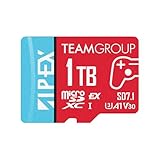
- Unleash Extreme Speed- Powered by SD 7.1 and PCIe Gen3x1 + NVMe 1.3, the APEX microSD achieves up to 800MB/s read and 700MB/s write—perfect for 4K/8K content, fast transfers, and high-performance gaming.
- Compatible w/ Nintendo-Switch 2- Engineered to meet the demands of the next-gen Switch 2 console, ensuring ultra-fast load times, smoother gameplay, and quick access to massive game libraries.
- Flexible Storage Options – Available in multiple capacities up to 1TB, offering the perfect fit whether you're a casual gamer or a content-heavy pro.
- Battle-Tested Durability- Resistant to water, shock, X-rays, and extreme temperatures, making it the ideal storage solution for gaming on the go and rugged environments.
- Universal Compatibility- Fully backward compatible with UHS-I devices, while unlocking full SD Express potential on next-gen hardware—future-ready and versatile.
- downloaded games and other software;
- downloadable content;
- software updates and patches; and
- screenshots and videos, subject to Nintendo’s album limits.
Save data remains in system memory. Some data may also be required to remain on internal storage, so a full card can cause supported captures or other data to fall back to internal storage. Nintendo’s storage-location and software-movement guidance should take priority if a particular game behaves differently.
Nintendo’s stated limits for system version 20.1.1 or later were up to 15,000 screenshots in system memory and on microSD Express, up to 1,500 videos in system memory, and up to 5,000 videos on microSD Express. These limits are firmware-dependent and should be rechecked before relying on them.
How to move games between internal storage and the card
Use the console’s data-management function to move supported software data between internal storage and the microSD Express card. This can include games, DLC, and update data, although some update data may remain in internal storage. It does not move ordinary save data, because saves remain in system memory.
If the card is full, moving or archiving software may be necessary. Do not assume that moving a game creates a second independent save location. For current U.S. labels, follow the data-management instructions displayed by your firmware and Nintendo’s software data movement guidance.
How to migrate to a larger Switch 2 card
For a Switch 2 Express card upgrade, Nintendo’s documented method uses a Windows PC:
- Keep the original microSD Express card until the migration is complete and verified.
- Prepare the new microSD Express card according to Nintendo’s current instructions.
- Connect the old card and copy the entire Nintendo folder to the new card.
- Copy the folder without changing its contents, names, or structure.
- Do not casually copy multiple cards into one folder or attempt to merge their contents.
- Use the copied data from the new card rather than treating both cards as simultaneous copies of one library.
Nintendo’s card-replacement guidance is the authority for the current procedure. A Windows PC needs a compatible card reader; an Express-capable reader is preferable for large transfers, while a conventional reader may limit transfer speed. Keep the old card untouched until games and captures are confirmed on the replacement.
This is different from transferring from the original Nintendo Switch. A conventional microSD card from the old Switch cannot become Switch 2 game storage. Nintendo provides a dedicated way to import screenshots and videos from an old card, but old Switch game data on that card is not usable as Switch 2 game storage. Use Nintendo’s system-transfer guidance and screenshot and video import instructions for those separate tasks.
Thermals and Express card readers
microSD Express uses PCIe/NVMe technology and can run warmer than conventional UHS-I cards. Samsung advertises Dynamic Thermal Guard, SanDisk advertises adaptive thermal management, and Lexar sells an actively cooled Express reader. These features matter most during large PC transfers and benchmarking. You do not need to buy a cooling accessory for the Switch 2 based on these claims; simply use a reputable card and avoid interrupting long transfers.
Quick wins for a faster PC:
Clear out junk files and repair common Windows errorsFree Scan →Fix the driver behind crashes, sound loss and screen glitchesFind Drivers →A special Express reader is not required merely to insert the card into Switch 2. It is relevant when copying data through a PC or benchmarking the card. A non-Express reader can prevent the card from demonstrating its advertised high-speed interface, so PC results made with different readers are not directly comparable.
If Switch 2 does not detect the card
- Restart the console.
- Turn it off completely, not just into sleep mode.
- Remove and reinsert the card straight and in the correct orientation.
- Confirm that it is genuinely microSD Express and not an ordinary microSDXC or UHS-I card.
- Connect to the internet and install any system update requested for first use.
- If available, test the card in another compatible Express device or reader.
- If one card fails across multiple compatible devices, treat it as defective and pursue the manufacturer or retailer warranty.
- If multiple known-good Express cards are not detected, contact Nintendo about console service.
Do not repeatedly format a card that contains the only copy of important captures. For SanDisk cards, consult SanDisk’s Express support and troubleshooting page; use the equivalent support page for another manufacturer.
Best Value

- [Design for next gen gaming]: NintendoSwitch 2, Steam Deck, Rog Ally, other portable gaming devices and Android Gaming Smartphones, this card goes beyond basic storage. Store more videos, movies, games, music.
- [Revolutionary performance]:4x faster than typical UHS-I microSD cards
- [Performance]: Incredible speed Read/write Speeds Up To 880MB/750 MB/s. The premier 1TB model offers immediate access to a vast library of games, enabling endless play. Combining premier storage with swift performance, the card allows for quick game starts. Note: read/write speed depend on the device, interface, usage and other factors so that actual performance may be lower.
- [Backwards-compatible]: with UHS-I and UHS-II (at UHS-I speeds) host devices, future-proofed for microSD Express devices
- [Reliable & Durable]: Drop proof, shock proof, waterproof, dust proof, Static proof, and X-ray proof
Buying checklist
- ✓ The product name explicitly says microSD Express.
- ✓ The physical card or packaging shows the EX/Express logo.
- ✓ The exact capacity and model number appear on the manufacturer’s own page.
- ✓ The product page identifies Switch 2 compatibility or clearly documents the microSD Express interface.
- ✓ The card is microSD, not full-size SD Express.
- ✓ The seller is the manufacturer, a major retailer, or an established authorized seller.
- ✓ The price remains reasonable after shipping, membership discounts, and taxes.
- ✓ You have checked the warranty term, region, proof-of-purchase requirement, and seller.
- ✓ You are comparing nominal capacity and actual use case, not just the highest advertised read speed.
- ✓ You will keep the original card during migration and back up important captures separately.
What leading buying guides often get wrong
- Calling every option a microSD card: the technically important term is microSD Express. An ordinary card made for the original Switch is not a Switch 2 game-storage recommendation.
- Ranking by sequential read speed alone: PC benchmark winners are not automatically the fastest in Switch 2 games.
- Confusing licensing with performance: Nintendo licensing is useful reassurance, but it does not prove superior loading times.
- Presenting a temporary price as permanent: retailer prices, membership discounts, stock, and product variants change quickly.
- Ignoring capacity-specific specifications: PNY and other families can quote different speeds for different capacities.
- Failing to separate saves from downloads: a card expands software storage, not normal save-data storage.
- Omitting migration: old Switch cards cannot be reused as Switch 2 game-storage cards, and multiple Switch 2 card contents should not be merged casually.
- Listing obscure cards without support information: AGI, Suneast, NEXT, Onn, and retailer-branded products may be valid, but manufacturer identity, warranty, availability, and independent testing all matter.
Frequently Asked Questions
Does Nintendo Switch 2 support ordinary microSD cards?
Not for expandable game storage. Switch 2 requires a genuine microSD Express card. Ordinary microSD, microSDHC, microSDXC, UHS-I, SanDisk Extreme, Ultra, and similar cards do not qualify merely because they are fast or marketed for gaming.
Is microSDXC the same as microSD Express?
No. microSDXC describes a capacity category, while microSD Express describes the high-speed interface. A product can be microSDXC without being microSD Express. Look for the EX or Express logo and the exact manufacturer model.
Is a 1TB card worth it?
It is worthwhile for a large digital library, frequent Game-Key Card downloads, or anyone who dislikes deleting and redownloading games. It is unnecessary for many physical-game owners. Compare the 1TB price with two 512GB cards and check warranty before paying a premium.
Are Nintendo-licensed cards faster?
Not necessarily. The SanDisk card is officially licensed and easy to identify, but independent comparisons found that compatible cards generally produce very similar Switch 2 loading times. Licensing is a reassurance signal, not a guaranteed performance advantage.
Can I move Switch 2 save data to the microSD Express card?
No. Normal save data remains in the console’s internal system memory. The card stores supported downloaded software, DLC, updates, screenshots, and videos; it is not a normal save-data backup.
Can I combine two microSD Express cards into one library?
Nintendo does not provide a seamless library-union process. When upgrading, copy the entire Nintendo folder from the old card to the new card using a Windows PC, do not merge multiple folders casually, and keep the original until the replacement is verified.
Quick wins for a faster PC:
Scan for outdated or missing drivers - takes under a minuteDriver Scan →Repair Windows errors before they cause bigger problemsFix Now →Fix the driver behind crashes, sound loss and screen glitchesFind Drivers →Can I use my old Nintendo Switch microSD card in Switch 2?
Not as Switch 2 game storage. A conventional card from the original Switch can be used through Nintendo’s supported workflow to import screenshots and videos, but Switch 2 requires microSD Express for its expandable software storage.
Do physical Switch 2 games require storage space?
Sometimes. Some physical releases require downloaded data, and Game-Key Card software requires downloaded data plus the physical key card when launching. A physical purchase therefore does not always eliminate the need for a microSD Express card.
Do I need a special reader for a microSD Express card?
You do not need one to use the card in Switch 2. For Windows migration or PC benchmarking, an Express-capable reader is preferable because a conventional reader may limit transfer speed.
What does the EX logo mean?
It identifies the microSD Express interface. Treat it as a key buying check, but still match the model number and manufacturer documentation because counterfeit or misidentified marketplace listings can use misleading titles or images.
Free tools Windows power users keep installed
One-click scans. No signup required.
What happens if the card fails?
Downloaded games and other card-stored data may need to be redownloaded or restored from a replacement card, while normal save data remains in internal system memory. Keep important screenshots and videos backed up separately, and use the manufacturer warranty if a card fails in multiple compatible devices.
The Bottom Line
Buy a genuine 512GB microSD Express card from a reputable seller unless your needs point elsewhere. Pick SanDisk for official licensing, ADATA for the tested 512GB performance recommendation when priced well, PNY or GameStop for value, and TeamGroup Apex, Lexar PLAY PRO, PNY, or GameStop for 1TB capacity after checking the current warranty and seller. Do not pay a substantial premium for a higher sequential-speed number: current Switch 2 testing indicates that compatible cards load games at broadly similar speeds, while extra capacity and trustworthy support make the bigger practical difference.
Quick Recap
Product prices and availability are accurate as of the date/time indicated and are subject to change. Any price and availability information displayed on Amazon at the time of purchase will apply.




