The best small gaming PCs of 2025 split into two very different groups: compact systems with laptop-class dedicated graphics that can handle serious 1080p and 1440p gaming, and much smaller integrated-graphics machines that are excellent for esports, older AAA games, emulation and everyday use. The ASUS ROG NUC (2025) is the premium compact powerhouse, while systems such as the Beelink SER9 Pro show how capable an ultra-small APU machine can be.
Neither category is a universal desktop replacement. Dedicated-GPU mini PCs cost more and offer fewer upgrades than conventional desktops; integrated-graphics models are impressive for their size but are not designed for uncompromised 1440p or native 4K AAA gaming. Your target resolution, tolerance for fan noise, upgrade plans and complete system cost matter more than the word “gaming” on the box.
As an Amazon Associate I earn from qualifying purchases.
What counts as a small gaming PC?
“Small gaming PC” usually describes one of three products:
Crashes, No Sound, or Screen Glitches?
Random freezes, missing sound and display glitches usually trace back to one bad driver. Find and replace yours safely.Free scan · under a minuteWindows Errors? Fix Them Before They Spread
Repair common Windows errors and clear accumulated junk for a smoother, more stable PC - no reinstall needed.Free scan · no reinstall- Ultra-compact mini PCs: laptop processors, integrated graphics, an external power brick and one or more M.2 SSD slots. They suit esports, indie games, emulation, older AAA titles and game streaming.
- Dedicated-GPU gaming mini PCs: larger compact systems with mobile GeForce RTX or Radeon graphics and more substantial cooling. These are the genuine modern-AAA options.
- Small-form-factor desktops: conventional desktop components installed in a compact case. They are usually larger than a mini PC, but offer the best upgradeability and performance per dollar.
A three-liter gaming mini PC and a seven- to twelve-liter SFF desktop may both be marketed as “small,” but they are not interchangeable. The former prioritizes footprint and convenience; the latter retains much more of a desktop’s expansion and repair potential.
#1 Best Overall
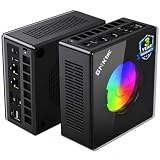
- AMD Ryzen 9 8945HS Processor - GMKtec K11 mini pc equipped with the AMD Ryzen 9 8945HS CPU, featuring 8 cores, 16 threads, and boost up to 5.4 GHz. It offers superior multitasking performance for demanding tasks like gaming and content creation, with energy-efficient power management at 35W TDP (upgradable to 70W)
- 32GB DDR5 + 1TB PCIe 4.0 SSD - GMKtec K11 mini computers comes with 32GB(dual-channel) DDR5 RAM at 5600 MT/s , which can be expanded to 128GB and 1TB PCIe 4.0 M.2 2280 SSD supports dual PCIe Gen4 x4 SSD slots expanded up to 8TB, ensures lightning-fast read/write speeds
- WHY CHOOSE DDR5 5600MHz DUAL CHANNEL (2×16GB) - With a 5600MHz clock—a 17% frequency uplift over 4800MHz—this kit delivers massive bandwidth gains that elevate real-world performance. Gamers enjoy higher minimum FPS and less stutter in open-world and sim titles for a smoother competitive experience. Video editors and 3D creators benefit from faster 4K/8K timeline scrubbing, quicker renders in DaVinci Resolve and Premiere, and swifter asset loading. For AI/LLM workloads, the superior throughput reduces I/O bottlenecks, cuts token generation latency, and accelerates model fine-tuning by keeping processing cores fed with data—so you wait less and create more.
- Oculink Port - The Oculink port enables higher bandwidth capabilities, better frame rates and lower lag. The standard also operates at PCIe x4 speeds, compared to Thunderbolt's x3. Gamers and content creators can benefit from Oculink's higher bandwidth, resulting in better performance and lower lag for eGPU setups
- 4-Screen 4K Display Support - K11 mini pc supports simultaneous 4K display output on 4 screens via HDMI 2.1 (4K@60Hz), DisplayPort 2.1 (4K@60Hz), and USB4 (up to 40Gb/s). Ideal for multitasking, it provides an immersive experience for professional work, gaming, and entertainment
What changed in 2025?
Integrated graphics became substantially more capable
AMD’s Ryzen AI 300-series processors brought Radeon 890M graphics to compact systems. The Beelink SER9 Pro, for example, is listed with a Ryzen AI 9 HX 370, Radeon 890M graphics, 32GB of LPDDR5X-7500 memory and a 135 × 135 × 44.7mm chassis.
That is a meaningful step above ordinary office mini PCs, but it remains an integrated GPU. It borrows system memory rather than using dedicated VRAM, and performance depends heavily on memory bandwidth, cooling, power limits and the game. A 64GB iGPU system does not become equivalent to a discrete RTX machine simply because it has more total memory.
Dedicated graphics fit into smaller premium systems
The 2025 ROG NUC demonstrates the high end of the category. ASUS specifies an Intel Core Ultra 9 275HX, configurations supporting NVIDIA RTX 5060, 5070, 5070 Ti and 5080 Laptop GPUs, up to 96GB of DDR5-6400 memory and a sub-three-liter-class enclosure.
Do these 3 things before closing this tab:
1Clear out junk files and repair common Windows errors2Scan for outdated or missing drivers - takes under a minute3Repair Windows errors before they cause bigger problemsThese are laptop GPU implementations, not automatically desktop cards with identical names. Power limits, cooling, firmware, memory configuration and clocks can produce substantial differences between a mobile GPU and its desktop counterpart.
AI features are separate from gaming performance
Many 2025 mini PCs promoted NPUs and AI-PC features. Those can be useful for supported local AI, video conferencing and creator applications, but NPU TOPS do not establish game performance. For gaming, prioritize the GPU architecture, GPU power limit, graphics memory, sustained benchmarks, frame-time behavior and noise.
Best small gaming PCs by category
| Category | Representative choice | Graphics class | Best for | Main drawback |
|---|---|---|---|---|
| Premium compact gaming | ASUS ROG NUC (2025) | Up to RTX 5080 Laptop | High-end 1080p/1440p gaming in a very small enclosure | Price and limited upgrades |
| Dedicated-GPU alternative | Minisforum AtomMan G7 Pro | RTX 5070 Laptop | Modern AAA gaming without ROG NUC pricing | Mobile GPU limits and specialist-vendor support |
| Tiny integrated-graphics system | Beelink SER9 Pro | Radeon 890M | Esports, older AAA games and everyday computing | No discrete VRAM; memory may be soldered |
| High-memory AI/creator hybrid | GMKtec EVO-X2 | Radeon 8060S-class integrated graphics | Gaming combined with local AI and creator workloads | Shared-memory trade-offs and uncertain gaming value |
| Modular upgrade path | OCuLink mini PC plus eGPU | External desktop GPU | A small everyday PC that becomes a gaming station | Extra hardware, cost and cabling |
| Best enthusiast value | Small-form-factor desktop | Replaceable desktop GPU | Maximum performance and long-term upgrades | Larger, less turnkey and harder to configure |
ASUS ROG NUC (2025): the premium compact powerhouse
The ROG NUC is the clearest example of a mini PC designed for serious PC gaming rather than merely being able to launch games. ASUS lists a Core Ultra 9 275HX, up to an RTX 5080 Laptop GPU, up to 96GB of DDR5 memory, Wi-Fi 7 and Windows 11 Home in its 2025 range. Exact configurations vary by market and listing, so check the GPU, RAM, SSD and included operating system rather than treating “ROG NUC” as one performance level.
It is aimed at buyers who want a finished, branded system for high-refresh-rate 1080p, 1440p gaming, ray tracing with upscaling and GPU-accelerated creator work. TechRadar’s review of an RTX 5080 configuration reported strong results in games including Cyberpunk 2077, Shadow of the Tomb Raider and Total War: Warhammer III; those figures describe that tested configuration, not every ROG NUC variant. See the review’s test results for context.
Why buy it: very high performance for the footprint, turnkey setup, strong mobile CPU/GPU combination and a clean living-room or desk installation.
Why not: it is expensive, its GPU is not a desktop replacement card, internal upgrades are limited and repairs can be more costly than with a standard tower. A conventional SFF desktop may deliver more performance per dollar, while a gaming laptop may include a display, keyboard and battery for comparable money.
Minisforum AtomMan G7 Pro: a discrete-GPU alternative
The AtomMan G7 Pro occupies the middle ground with an Intel Core i9-14900HX, an RTX 5070 Laptop GPU, 2.5Gb Ethernet and Wi-Fi 7. It is a more appropriate choice for modern AAA gaming than an 890M-only mini PC, particularly at 1080p and 1440p with sensible settings.
The RTX 5070 Laptop GPU should not be equated with a desktop RTX 5070. The exact power limit and cooling design matter. Minisforum configurations and prices can also change frequently, and listings may differ in RAM, storage and Windows inclusion. The U.S. store showed a $1,359 promotional price reduced from $1,699 when observed; that is a dated price signal, not a permanent MSRP.
What’s actually slowing this PC down?
Pick the symptom - the matching free tool is one click away.
Choose it if: you want dedicated graphics in a compact enclosure and are comfortable checking specialist-vendor warranty, BIOS and support details.
Skip it if: you need a replaceable desktop GPU, major-brand retail support or a standardized configuration available everywhere.
Rank #2

- Built to Conquer. Ready to Rule: Powered by the AMD Ryzen 9000 Series processor, ROG GR70 delivers elite-tier gaming performance once reserved for bulky desktops—now in a compact form that answers your call for more power, less space.
- Every Frame. Every Kill—Faster: Paired with NVIDIA GeForce RTX 50-Series mobile GPU, ROG GR70 ensures ultra-smooth gameplay with high FPS and low latency. Dominate every match with lightning-fast reflexes and no dropped frames.
- Always Connected. Always Ahead: Featuring Wi-Fi 7 with certified Bluetooth 5.4, ROG GR70 is built to eliminate bottlenecks and get you ahead—whether you're online, syncing gear, or booting into the next match.
- Cool. Quiet. Ruthless: Advanced thermal design with custom cooling system keeps temperatures down and acoustics low—even under intense loads. It’s deadly silent and deadly fast.
- Mini Size. Mega Impact: ROG GR70 fits power and aesthetics into an ultra-compact, silver-hued chassis. It’s desk-friendly, travel-ready, and designed to stun—without compromising what's under the hood.
Beelink SER9 Pro: the tiny integrated-graphics option
The SER9 Pro represents the upper end of slim APU mini PCs. Its official specification includes a Ryzen AI 9 HX 370, Radeon 890M graphics, 32GB LPDDR5X-7500 memory, up to 8TB of storage capacity, Wi-Fi 7 and a 135 × 135 × 44.7mm chassis.
It is a good fit for competitive games, older AAA releases, indie games, emulation, everyday work and cloud gaming. Many games can be playable at 1080p with an appropriate quality preset, but demanding new releases may require reduced settings or upscaling. At 1440p, results become much more game-dependent; native 4K ultra gaming is not a realistic expectation.
Free tools Windows power users keep installed
One-click scans. No signup required.
Pay particular attention to the memory design. The listed LPDDR5X memory is a warning to verify whether RAM is soldered before buying. Soldered memory can improve bandwidth and enable a thinner design, but it cannot be replaced or expanded later. For a new gaming system, 32GB is a sensible target, while 16GB is increasingly restrictive for modern games and multitasking.
GMKtec EVO-X2: integrated graphics with an AI and memory focus
The GMKtec EVO-X2 uses AMD’s Ryzen AI Max+ 395 platform and is aimed at buyers who want unusually strong integrated graphics, large memory capacity and local AI or creator performance in a compact system. GMKtec lists Wi-Fi 7, two M.2 SSD slots supporting up to 8TB and a Radeon 8060S-class integrated graphics platform.
This can be an unusually capable unified-memory design, but it is still not the same as a dedicated GPU with its own high-speed VRAM. Compare it using actual game testing, not just AI TOPS or theoretical compute figures. If gaming is your only priority, a dedicated-GPU mini PC, an OCuLink setup or an SFF desktop may offer a clearer performance path.
What gaming performance should you expect?
1080p
This is the most comfortable target for the category. Integrated Radeon systems are best suited to esports, older AAA games and modern titles using reduced settings or upscaling. RTX 5060- and 5070-class compact systems are better choices for high-refresh-rate AAA gaming.
Recommended Free Tools
1440p
Dedicated-GPU mini PCs are the sensible starting point. Performance varies by game and mobile GPU power limit, but DLSS, FSR or another upscaler may make 1440p practical. An iGPU can handle selected games at this resolution, but it should not be treated as a general-purpose 1440p ultra machine.
4K
Premium systems may produce a good 4K output using upscaling and, where supported, frame generation. That is different from rendering a demanding game natively at 4K on ultra settings. “Supports 4K” may only describe display output, not gaming performance.
Integrated graphics versus a discrete GPU
Integrated graphics share the CPU’s memory and power budget. They make a mini PC exceptionally small and efficient, but higher resolution, ray tracing and large texture packs expose their limitations. Symptoms can include stuttering, texture pop-in and reduced performance when the shared memory system becomes a bottleneck.
A discrete mobile GPU has its own graphics memory and a much higher graphics power budget. It is the better choice for modern AAA games, ray tracing and 1440p, but it requires a larger cooling system and usually costs substantially more. The GPU’s model number is not enough: check the exact laptop or mobile implementation and its power limit.
OCuLink and external GPUs
OCuLink gives compatible mini PCs a more direct PCIe connection to an external GPU than ordinary USB4 arrangements. Minisforum’s gaming range includes OCuLink products, including the DEG2 dock listed at $259.90 when observed. That dock is only one part of the setup.
An eGPU arrangement also needs a compatible mini PC, the dock or enclosure, a graphics card, a suitable power supply if one is not included, an OCuLink cable and compatible drivers. Add the costs before calling it a value alternative. You also regain a second box, more cabling, more noise and possible bandwidth loss—the very complexity a mini PC is supposed to avoid.
It makes the most sense for someone who wants a very small portable or everyday computer that can become a more powerful gaming station when connected to a desk.
Rank #3

- Office Gaming Mini PC - UPGRADED GMKtec Nucbox M5 Ultra Series is equipped with the powerful AMD Ryzen 7 7730U processor, 8 Cores/16 Threads, Base 2.00GHz (Power Saving Quiet Mode) with Turbo Boost up to 4.50GHz (Performance Mode) in BIOS settings, Based on the ZEN 3+ architecture, this small but powerful mini pc delivers satisfying results in productivity, office work, and gaming. 35% Performance increase over AMD Ryzen 5 7430U/ Ryzen 7 5700U, 5600U, 5560U, 5500U.
- 16GB DDR4 RAM & 256GB PCIe SSD - Installed with DDR4 16GB RAM (1x16GB), the Nucbox M5 Ultra mini pc support expansion to 64GB RAM. Featured with 256GB M.2 2280 PCIe 3.0 SSD, support dual slot expansion to 4TB SSD. (Upgrades not included)
- DUAL NIC LAN 2.5G RJ45 - Fast Network Speeds: Enjoy up to 2500Mbps data transmission speed without worrying about lagging. Ideal for working, gaming, and surfing the internet. Great for Untangle, Pfsense or as a server office PC.
- Mini Desktop Computer with 4K Triple Screen Display - Nucbox M5 Ultra integrates AMD Radeon Graphics 8 Cores 2000 MHz GPU to deliver powerful graphics processing power to easily handle the demands of complex design software, 4K@60Hz UHD video editing, and playback. It can connect to 3 display screens simultaneously.
- Fast Internet WiFi 6E + BT5.2 Connection - GMKtec Mini PC with WiFi-6E Wireless, have 2.5G/5G/6G triple band, more faster and lower latency. Bluetooth 5.2 allowing you more quickly to connect other wireless devices (headset, mouse, keyboard, etc.) Interface features 2*USB3.2 ports, 2*USB2.0 ports, 1*HDMI 2.0 port(4K@60Hz), 1*USB-C port(PD/DP/DATA), 1*DP Port, 1*Audio 3.5mm (HP&MIC), 1*DC Power Port.
Cooling, noise and sustained performance
A compact chassis has less airflow and thermal mass than a tower. A mini PC can look impressive in a short benchmark and then reduce clocks after a longer session. Look for sustained testing over 20–30 minutes or more, not only a single peak score.
The Tool Desk
Outbyte Driver Updater FREEScan for outdated or missing drivers - takes under a minuteDriver Scan →Outbyte PC Repair FREEClear out junk files and repair common Windows errorsFree Scan →- Keep intake and exhaust vents clear; do not hide the unit in an enclosed cabinet.
- Compare quiet, balanced and performance modes. More power can mean more fan noise without proportional frame-rate gains.
- Check whether the power brick becomes hot or inconveniently bulky.
- Cleanable fans and accessible internals are valuable for long-term ownership.
- A vertical stand helps only when it preserves the manufacturer’s intended airflow.
Claims such as “quiet” need a test mode and workload attached. Fan behavior changes significantly between desktop use, esports games and a sustained CPU/GPU load.
Ports, storage and upgradeability
Before buying, verify the exact port standards rather than relying on a USB-C logo. Check HDMI and DisplayPort versions, simultaneous-display limits, refresh rates, USB4 or Thunderbolt support and whether each port carries video, data, charging or some combination.
For storage, look for at least one accessible M.2 NVMe slot; a second slot is useful on larger systems. A 1TB drive can fill quickly when modern games occupy tens or more than 100GB each. Confirm whether the advertised capacity is installed or merely the platform’s maximum.
Mini PCs are generally closer to laptops than towers in repairability. You may be able to replace an SSD, SO-DIMM memory or Wi-Fi card, but usually not the CPU, GPU or cooling system. Verify the exact RAM type, number of slots, maximum capacity and dual-channel support. Do not plan a memory upgrade for a system using soldered LPDDR5X.
Quick wins for a faster PC:
Fix the driver behind crashes, sound loss and screen glitchesFind Drivers →Repair Windows errors before they cause bigger problemsFix Now →Mini PC versus the alternatives
| Alternative | Where it wins | Where the mini PC wins |
|---|---|---|
| Gaming laptop | Includes screen, keyboard, battery and straightforward portability | Cleaner fixed setup, often smaller at a desk and easier to connect to a large display |
| Console | Simple setup, predictable software and strong value for supported games | PC storefronts, mods, mouse-and-keyboard play and broader productivity use |
| SFF desktop | Desktop GPUs, better cooling, repairs and upgrades | Smaller footprint and less assembly |
| Ordinary tower | Best expansion and performance per dollar | Less visual and physical bulk |
If maximum gaming performance, future upgrades or easy repairs matter most, an SFF desktop is usually the more rational purchase. The mini PC should win because of its size, convenience or portability—not because every small system is cheaper or faster.
Small gaming PC buying checklist
- Set the target: 1080p, 1440p or 4K; esports or demanding AAA.
- Identify the exact GPU: integrated, mobile discrete or desktop discrete, including the power limit where available.
- Confirm the complete configuration: RAM, SSD, Windows license and power adapter.
- Check memory: soldered or replaceable, capacity, speed and slot count.
- Check expansion: M.2 slots, USB4, OCuLink and display outputs.
- Read sustained testing: look for temperature, noise, throttling and long-session results.
- Calculate total cost: include upgrades, eGPU hardware, accessories and the display.
- Verify support: warranty region, return policy, BIOS updates and replacement-part access.
- Check the current listing: mini-PC prices, coupons and regional configurations change frequently.
Which type should you buy?
Buy the ASUS ROG NUC if you want one of the smallest turnkey systems with serious dedicated-GPU gaming performance and accept a premium price and limited upgrade path.
Choose the Minisforum AtomMan G7 Pro if you want a dedicated mobile GPU in a compact system and are prepared to investigate the exact configuration and specialist-vendor support.
Choose an HX 370 mini PC such as the Beelink SER9 Pro if you want an exceptionally small everyday computer for esports, older AAA games, emulation and streaming, not native 4K ultra gaming.
Choose the GMKtec EVO-X2 if large shared memory, local AI and creator workloads matter alongside gaming. It is not automatically the best gaming value.
Choose OCuLink plus an eGPU if you value a tiny daily computer that can become a desk-bound gaming machine and accept the extra cost and complexity.
Skip mini PCs and build an SFF desktop if you want the best long-term gaming value, a replaceable graphics card, quieter sustained performance or straightforward repairs.
Quick Recap
Product prices and availability are accurate as of the date/time indicated and are subject to change. Any price and availability information displayed on Amazon at the time of purchase will apply.




