A PS4 can play DVD movies, but playback may fail if disc playback has not been enabled online once, the DVD is unsupported or unfinalized, its region is incompatible, parental controls block it, or the disc or console cannot be read. Check these causes in order, starting with the least disruptive steps.
1. Check that the DVD format is supported
Sony lists these supported DVD formats for PS4:
- DVD-ROM
- DVD-R and DVD-RW in video mode or VR mode
- DVD+R and DVD+RW
An unfinalized DVD is not supported. If the disc was recorded or burned, check that it was finalized and created in a compatible format. See Sony’s supported and unsupported disc formats.
2. Enable disc playback if this is the first time
Before a PS4 can play a DVD or Blu-ray for the first time, its disc playback feature must be enabled over the Internet once. After activation, an Internet connection is not required for each playback session. Sony’s instructions are at How to play video and music from discs and USB drives.
3. Check the DVD’s region
If the console displays error CE-35489-9, Sony identifies it as an invalid-region disc. The PS4 region setting cannot be changed to make that DVD play. Check the disc’s region marking and Sony’s CE-35489-9 guidance.
Windows Errors? Fix Them Before They Spread
Repair common Windows errors and clear accumulated junk for a smoother, more stable PC - no reinstall needed.Free scan · no reinstallOutdated Drivers Are Slowing You Down
One free scan finds every outdated or missing driver and matches the right update for your exact hardware.Free scan · exact hardware match#1 Best Overall

- [Universal Compatibility for All Consoles] This versatile game holder is designed to fit standard disc cases from 11-15mm. It is fully compatible with PS5, PS4, PS3, Xbox Series X/One/360, Nintendo Switch, and even Blu-ray movies. One storage rack solves all your cross-platform organization needs.
- [Massive 76-Disc Storage Capacity] Each 4-pack set is engineered for high-volume collectors. Consisting of 4 heavy-duty metal racks, it can hold a total of 76 game cases (19 per bracket). It’s an ideal organizer for large libraries of video games, DVDs, and CDs, ensuring your entire media collection stays in one place.
- [Space-Saving Wall Mount Solution] Maximize your room's potential with our wall mount video game storage design. By moving your collection to the wall, you free up valuable desk and floor space. This vertical storage shelf transforms cluttered stacks into a sleek, organized game display, making it the perfect furniture addition for any compact gaming room.
- [Quick Access & Modern Display] Stop digging through drawers! The open-access design of this media storage mount keeps all titles visible, allowing you to find your favorite game or movie in seconds. It’s not just a stand; it’s a professional-grade display rack that showcases your collection with style.
- [Heavy-Duty Metal & Easy Installation] Crafted from premium heavy-duty metal, this storage tower is built to last and won't deform over time. We provide all necessary hardware for a quick setup. Simply secure the two mounting holes to the wall for a rock-solid, stable holder that keeps your valuable game accessories safe.
4. Review DVD parental controls
DVD video restrictions can block playback even when the disc is supported and readable. Review the DVD video restriction and applicable country or region setting in the PS4 parental-control settings. Changing protected settings requires the password. Sony explains the rating and restriction settings on its ratings and parental controls page.
5. Clean the disc and test another one
Wipe dirt or fingerprints away with a soft, clean cloth, then try the DVD again. Also test another supported DVD, Blu-ray, or game disc. This comparison helps narrow the issue, but it does not by itself prove a hardware fault.
Rank #2
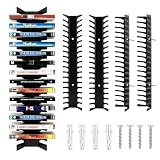
- High-Capacity Multi-Format Organizer: Holds up to 72 DVD, CD and Blu-ray discs in one organized wall-mounted system; Features three adjustable slot sizes for 11 mm, 13 mm and 15 mm cases
- Gamer-Friendly Design: Specially configured slots for PS2, 3, 4, 5, Xbox Series X and Nintendo Switch game cases; Keep your console collection visible and accessible for quick game changes
- Secure No-Drill Mounting Option: Includes heavy-duty adhesive strips for tool-free installation on most surfaces; Dual support points prevent tilting even when fully loaded with 72 discs
- Space-Saving Media Display: Transforms cluttered collections into a sleek wall display; Each 4-pack unit organizes up to 72 cases while complementing your room's decor with a modern metal finish
- Complete Game Room Organization: Consolidate your video game and movie collection into one efficient storage rack; End messy piles and easily locate any title from your organized wall system
- If only one DVD fails: Recheck that disc’s format, finalization, region, and condition. A problem with its recording is also possible.
- If several supported discs fail: Console-side disc-reading troubleshooting becomes more relevant.
Sony’s PS4 disc-issue troubleshooting covers cleaning and comparison testing.
6. Escalate carefully if the basic checks do not help
For persistent disc-reading problems, Sony recommends trying Safe Mode option 5, Rebuild Database. If that does not resolve the issue, Sony lists Initialize PS4 / reinstall system software as a later step. Initialization deletes information stored on the console, so do not use it casually; understand the data-loss consequences before proceeding. If problems persist, consult PlayStation Repairs through Sony’s troubleshooting guidance.
Do these 3 things before closing this tab:
1Repair Windows errors before they cause bigger problems2Fix the driver behind crashes, sound loss and screen glitches3Clear out junk files and repair common Windows errorsRank #3
![Airport Terminal Pack [DVD]](https://m.media-amazon.com/images/I/51u7TvlKDzL._SL160_.jpg)
- Factory sealed DVD
If the DVD spins but the screen stays blank
Sony’s published disc troubleshooting does not identify one universal cause for a disc that spins without displaying a movie. Check the supported format, one-time activation, region, parental restrictions, and disc condition first. If several supported discs also fail, follow Sony’s disc troubleshooting steps rather than assuming a specific hardware fault.
Quick Recap
Best Value
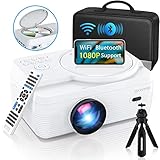
- 🎄【WiFi & Airplay & Screen Mirroring】Dxyiitoo WiFi projector built in DVD player supports the "Airplay" function and "Screen Mirroring" function. you can connected to iphone/Android phone /Mac/tablet.it supports the iOS and Android systems. you can play on your phone freely when using the "Airplay" function to project the app's video. and you won't miss any screen operations when using the "Screen Mirroring" function.
- 🎄【12000 lm & 250 inch Big Screen】 The image quality of 12000 lumens and the ultra-high contrast ratio of 8000:1 provide clearer, brighter, and more colorful images with delicate and wonderful image quality. The screen display supports up to 250 inches, which keeps your viewing distance to protect your eyes and bring you the ultimate home theater viewing pleasure.
- 🎄【Built In DVD Player】2023 upgraded LED projector With Built in DVD player, you can play the disc without additional DVD player.The large screen allows you and your family to enjoy a wonderful home theater experience. Supports direct play of CD, DVD, CD-R/RW, DVD -R/+R, DVD+RW/-RW, VCD, SVCD (but not blu-ray DVD)
- 🎄【Bluetooth & Surround Speaker】Built-in dual stereo speakers with SRS, provide clear well-balanced sound quality, a truly amazing sound experience. with Bluetooth, you can connect your ideal Bluetooth speaker wirelessly at any time.The projector is lower in noise and more durable than previous models thanks to advanced fan cooling technology.
- 🎄【Professional Service】Dxyiitoo offers every customer 100% satisfaction service. You can order it without any risks. If you meet any operation difficulties or quality issues, please feel free to contact us to get an immediate reply from our professional technical department.
Rank #4

- Shrink-wrapped
Product prices and availability are accurate as of the date/time indicated and are subject to change. Any price and availability information displayed on Amazon at the time of purchase will apply.




