Riot’s located Wild Rift support pages do not explain what error -13 or error -5 means, so neither code has a confirmed cause or guaranteed fix. Try Riot’s general connection checks, verify the game’s official-store installation and updates, and contact Riot Support if the errors continue.
What do Wild Rift errors -13 and -5 mean?
Riot’s Wild Rift support catalog does not include a code-specific explanation for either “Unknown Error -13” or “Unknown Error -5.” The codes therefore cannot be reliably identified as a network, server, account, region, or installation error based on the available official guidance. Riot’s Wild Rift support catalog lists general troubleshooting topics, but not a definition for these codes.
Players have reported similar wording in different contexts, including when launching the game and when asking about access from India. Those community posts are anecdotes, not evidence of a universal cause. They do not establish VPN use, changing stores, or any other workaround as a fix. A May 2022 community report and a December 2024 community report show that players have used similar error wording, but neither provides an official diagnosis.
What to try first
- Note when the error appears. Record whether it happens at launch, sign-in, during an update, or after entering a match. Save a screenshot and note your device model, operating-system version, country or region, game version, and app-store source. This context can help support investigate an error that has no published code-specific explanation.
- Compare Wi-Fi and mobile data. If you are on Wi-Fi, try mobile data; if you are on mobile data, try Wi-Fi. Change only the connection so you can tell whether the result differs. Riot recommends testing another connection as a general step for mobile connection issues, but it is not a confirmed fix for errors -13 or -5. Riot’s mobile connection troubleshooting guide provides the general advice and directs players to submit a support request if the problem remains.
- Check the game’s installation and updates. On Android, use Google Play; on iOS, use the Apple App Store. Riot’s installation guidance says Wild Rift stopped being offered in Samsung Galaxy Store effective March 16, 2023. Store availability can vary, so follow the official instructions relevant to your device and region. Riot’s installation and update guide covers the supported store guidance.
- Contact Riot Support if the error persists. Include the screenshot and the details you recorded, plus the results of your Wi-Fi and mobile-data tests. Riot’s general guidance offers a support-request path, but does not promise a particular resolution for these codes.
How to make your report useful
When contacting support, describe the error exactly as it appears, including the minus sign if shown. Report whether it happens on one or more connection types, whether it appears at launch or at another stage, and where you installed the game. These details help distinguish circumstances without assuming they identify the cause.
#1 Best Overall
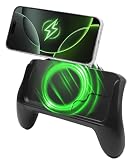
- POWER AND PLAY ALL DAY: Built-in 10,000mAh battery keeps your phone charged through extended gaming sessions for long play on Xbox Game Pass and more
- MAGSAFE COMPATIBLE MAGNETIC DESIGN: Strong magnetic attachment works seamlessly with MagSafe-compatible iPhones and wireless charging Android devices with no clamps and no hassle. Use with your phone case on or off
- ERGONOMIC PRO GAMING GRIP: Transforms your phone into a console-style handheld experience, improving control, grip, and comfort for competitive mobile gaming
- MICRO-VIBRATION COMFORT TECH: Integrated subtle vibration system designed to help reduce hand fatigue and keep your hands relaxed during long sessions
- NO LOW BATTERY INTERRUPTIONS: Stay fully focused during critical moments with no disruptive low battery warnings popping up mid-game. Keeps you locked in during intense sessions on League of Legends: Wild Rift and Roblox
- Exact message and a screenshot
- Device model, operating system, game version, and country or region
- Whether the game came from Google Play, the Apple App Store, or another source
- What happened on Wi-Fi compared with mobile data
What not to assume
Older community posts and third-party troubleshooting pages do not verify why these codes occur. Do not treat a VPN, an account-region change, or an unofficial APK as an established workaround. Riot’s located guidance supports connection testing and official-store installation; it does not confirm that those other actions resolve either error.
Quick Recap
Best Value

- Built for PC Gaming: Xbox-style asymmetric layout, Hall Effect sticks, 1000Hz polling and dual-stage triggers for competitive precision. Also works with Switch 2/Switch, Android and iOS via 2.4G, Bluetooth or USB-C. NOT for Xbox/PlayStation/Luna/GeForce
- Smart Charging Dock: Magnetic charging dock with auto-reconnection and USB-C fast charging. Built-in 2.4G receiver storage. Grab-and-play keeps this wireless PC controller charged. 2.4G wireless with 1000Hz polling for low-latency response
- Drift-Free Hall Sticks: 11-bit Hall Effect sensors with 1000Hz polling on 2.4G and wired keep aim pixel-perfect in FPS and precise in racing. Silicone-dampened sticks stay smooth and quiet through long sessions
- Quiet Buttons & 2-Stage Triggers: over 10 noise-reduction points keep late-night sessions silent. Flip the trigger lock between 3mm for faster shooting and 9mm for precise racing. 2+2 rumble motors add immersive feedback
- 1000mAh Battery & PC Extras: Extended gameplay with programmable back buttons for custom macros, dynamic RGB lighting, and turbo function. Ergonomic Xbox-style asymmetric layout ensures a comfortable grip during long PC gaming sessions
Rank #4

- Hall Effect Joystick – No Drift: Enjoy flawless control and eliminate joystick drift with the ECHTpower PC Gaming Controller.
- 1000Hz Polling Rate – Instant Response: With 1000Hz polling(2.4GHz/Wired), experience lightning-fast input registration for competitive gameplay where every moment matters.
- With charging base: Say goodbye to empty batteries when playing with our charging base. The docking station quickly charges your wireless controller via drop-and-charge. The USB extension port ensures stable connection, ideal for PC gaming and pro controllers. Enjoy uninterrupted gaming at home or on the go.
- Multi-Platform Compatibility: Works seamlessly on PC, Switch, iOS, and Android via Bluetooth, 2.4G wireless, or USB-C for versatile gaming across devices. NOTE: Before connecting, ensure that the mode button on the back is switched to the appropriate platform setting.
- 800mAh Battery – 15-Hour Playtime: No more frequent charging interruptions.
Rank #3

- Platform Compatibility: This PC controller is designed for Windows PC, Steam, Switch, Android, and iOS. Xbox-style asymmetric stick layout for PC gamers. Three modes cover all your devices. Please check your device compatibility before purchase
- Three Connection Modes: 2.4G wireless, Bluetooth, wired USB-C. PC gets native XInput/DirectInput. Switch pairs via Bluetooth, no adapter. This gaming PC controller switches devices seamlessly. Stable wireless minimizes random disconnects during gaming
- Hall Effect Precision: Hall effect joysticks and triggers eliminate stick drift. This gaming controller for PC delivers smooth, responsive input with no dead zones. Built for FPS, racing, and action games. Long-term precision for competitive PC gaming
- Back Buttons & Battery: Two programmable back buttons map combos and shortcuts. Textured grips with dual vibration. 1000mAh battery delivers up to 20H playtime. RGB can be turned off. A solid PC controller for gaming with custom back buttons
- ABXY Layout Switch: Press B + Minus + Plus to swap between PC and Switch modes. Features: 1000Hz polling rate, RGB lighting, turbo. Note: designed without mic jack or gyro sensor
Rank #2

- Universal Multi-Platform Compatibility: Works seamlessly with Windows PC, Switch/Switch 2, Android, and iOS via USB-C, 2.4G wireless (1000Hz), or Bluetooth (125Hz). Note: Not compatible with X-box, Play-Station, Luna, or GeForce
- Ultra-Quiet Silent Gaming: Silicone-damped buttons for whisper-quiet operation. Perfect for late-night gaming without disturbing family or roommates. All buttons redesigned for silent play—ABXY, D-pad, triggers, and function keys
- Hall Effect Precision Technology: Drift-free 11-bit Hall Effect joysticks with 1000Hz polling rate in wired/2.4G modes for ultra-fast competitive response. Bluetooth mode offers 125Hz for mobile gaming. Long-lasting durability guaranteed
- Advanced Trigger & Programmability: Dual-stage adjustable triggers with 2+2 rumble motors for realistic feedback. Two top-mounted programmable buttons avoid accidental presses—solving common back-paddle issues for competitive advantage
- Ergonomic Comfort & Endurance: Sweat-resistant silicone grip for marathon sessions. 1000mAh rechargeable battery for extended play. Upgraded 8-way D-pad with dome switches delivers precise diagonal control for fighting and retro games
Product prices and availability are accurate as of the date/time indicated and are subject to change. Any price and availability information displayed on Amazon at the time of purchase will apply.