
What’s actually slowing this PC down?
Pick the symptom - the matching free tool is one click away.
Xbox mode is a controller-first gaming interface built into Windows 11—not a new edition of Windows or a replacement for the desktop. Microsoft began rolling it out in select markets on April 30, 2026, bringing the former “full screen experience” to compatible laptops, desktops, tablets, and handhelds.
Xbox mode is a new controller-first gaming interface built into Windows 11—not a new edition of Windows and not a replacement for the desktop. It gives compatible PCs a console-style, full-screen way to browse games and supported apps, then lets you return to the normal Windows desktop without rebooting.
As an Amazon Associate I earn from qualifying purchases.
Microsoft began the phased rollout on April 30, 2026, in select markets. The feature was previously called the full screen experience or Xbox full-screen experience. It is now expanding beyond handheld gaming PCs to compatible Windows 11 laptops, desktops, and tablets.
Free tools Windows power users keep installed
One-click scans. No signup required.
What Xbox mode changes
When Xbox mode is active, Windows uses a selected gaming home app as the main launcher. Games and supported apps appear in a full-screen, controller-optimized interface designed to reduce the distractions of the traditional desktop.
#1 Best Overall

- The 2.4 GHz wireless connection uses a tiny Plug-and-Forget Nano-receiver that stays in your USB port, even on laptops, for fast data transmission with minimal delays, dropouts, or interference.
- With broad game support, the Logitech Wireless Gamepad F710 works with old standbys to today's biggest titles, so it's easy to set up and use with your favorite games
- Profiler software allows the gamepad to be programmed to perform keyboard and mouse commands for games without gamepad support.* Requires software installation
- Dual vibration motors let you feel every hit, crash and explosion in games that support vibration feedback for a more realistic and immersive experience
- A familiar control layout that doesn't require a learning curve to be able to use, with all the same buttons as on game console controllers
The experience can bring together:
- Games installed on the PC
- Titles available through the Xbox app and Xbox Game Pass catalog
- Installed games from leading or popular PC storefronts
- Recently played games and apps
That makes Xbox mode a unified launcher and navigation layer, rather than a new game format. It does not make every PC game compatible with every storefront, and it does not allow an ordinary Windows PC to run console-exclusive Xbox games natively simply because Xbox mode is enabled. A title still depends on its own PC version, launcher, account requirements, hardware requirements, and storefront support.
Xbox mode is optional, and the Windows desktop remains
Xbox mode does not replace the Windows shell. It is an optional mode within Windows 11. You can use the console-like interface while choosing a game, switch between open games and apps, and return to the regular desktop when you need your normal windows, files, browser, or productivity software.
On PCs, entering or leaving Xbox mode does not require a restart. You can exit through Game Bar settings or Task View, or press Win + F11.
Who can use Xbox mode?
Microsoft’s Xbox mode support documentation requires Windows 11 version 24H2 or later, across all editions. Availability is also limited by supported markets and the phased rollout, so a compatible version of Windows does not guarantee that the feature will appear immediately.
Microsoft announced the public rollout for Windows 11 laptops, desktops, tablets, and handheld devices in select markets on April 30, 2026. The company said availability would expand over the following weeks rather than reach every compatible PC at once.
The feature’s earlier preview began reaching Windows Insiders on broader PC form factors—including laptops, desktops, and tablets—on November 21, 2025. That preview required the Xbox app from the Microsoft Store and was distributed gradually to Dev and Beta Channel participants. An April 17, 2026 Canary build used the name “Xbox mode,” but Canary features can change or disappear; the later public rollout announcement is the more important date for general users.
Is Xbox mode available on Windows 10?
No, not according to Microsoft’s Xbox mode requirements. Xbox mode itself requires Windows 11 version 24H2 or later. The general Xbox PC app has a broader requirement of Windows 10 or Windows 11 version 22H2 or later, but that app requirement should not be confused with the stricter requirement for Xbox mode.
Quick wins for a faster PC:
Fix the driver behind crashes, sound loss and screen glitchesFind Drivers →Repair Windows errors before they cause bigger problemsFix Now →Scan for outdated or missing drivers - takes under a minuteDriver Scan →Rank #2

- RGB Cool Lightning Bolt & Long Battery Life: Switch controller with lightening bolt style and 9-color LED looks really cool; 4 light modes: solid lights, breathing lights, RGB strobe led light and led off; Fully charged: 3-4 hours, Runtime: 10-15 hours
- Widly Compatible & One-key Pairing/Wake Up: The switch pro controller is compatible with Switch/Lite/OLED/PC Windows 7/8/10 (only wrok for pc under wired connection); 2 pairing ways; Support one key to wake up your switch console
- Programmable Button & 3 Speeds Turbo: Switch controllers has simplify complex skill operations with M1/M2 key; Support single and multiple mapping; 3 adjustable burst: 5 shots/s, 12 shots/s and 20 shots/s; Programming and Turbo will maximize game play
- Sensitive Motion Control & 4-Level Nice Vibration: 6-axis gyro sensor help you react quickly, enhance experience in sports games; Buttons and joysticks are responsive, no lag; Dual vibration motors with 4-level feedback: Strong, Medium, Weak and None
- Great Gift For All People: This cool switch controller will be great gifts for women, men, girl, boy, family and friends; Packing list: 1 X Wireless switch controller, 1 X Type-C cable, 1 X Detailed user manual, 1 X Cool gift box
How to turn on Xbox mode in Windows 11
On a laptop, desktop, or tablet:
- Open Start > Settings > Gaming > Xbox mode.
- Turn on Enable Xbox mode.
- Optionally turn on Show Xbox mode in Task View.
Once enabled, you can enter Xbox mode from Game Bar settings, Task View, or by pressing Win + F11.
Microsoft also recommends enabling Get the latest updates as soon as they are available under Settings > Windows Update if you want to receive the feature as soon as it reaches your device. That setting does not override a market or rollout restriction, and it is not a guarantee that every update arrives immediately.
Handheld setup
On a supported Windows gaming handheld, open Start > Settings > Gaming > Xbox mode. From there, choose a supported gaming home app and, if desired, enable Enter Xbox mode on startup.
The startup option is particularly relevant to handhelds. Microsoft says Windows can limit background processes while gaming and delay some startup apps until you return to the desktop. The intended benefits are less background activity and potentially better battery life or gaming performance on that configuration. Microsoft does not promise a universal frame-rate improvement for every handheld, laptop, or desktop, so Xbox mode should not be treated as a performance-tuning tool by itself.
Crashes, No Sound, or Screen Glitches?
Random freezes, missing sound and display glitches usually trace back to one bad driver. Find and replace yours safely.Free scan · under a minuteWindows Errors? Fix Them Before They Spread
Repair common Windows errors and clear accumulated junk for a smoother, more stable PC - no reinstall needed.Free scan · no reinstallHow to navigate and exit the interface
Xbox mode is designed primarily for a controller, but it also supports keyboard and touch entry points.
| Action | Method |
|---|---|
| Enter or exit Xbox mode | Win + F11, Game Bar settings, or Task View |
| Open Task View | Win + Tab, a long press of the Xbox controller button, or a bottom-edge swipe on a touch device |
| Touch navigation | Swipe up from the bottom to open Task View |
| Controller navigation in Task View | Use the left stick and shoulder buttons |
| Foreground a selected item | Press the controller’s A button |
| Close a selected item | Press the controller’s X button |
Task View is the main switching mechanism for moving between open games and apps. It is not the same as having a conventional desktop full of freely arranged windows.
Important desktop limitations
Xbox mode changes how Windows presents applications:
Rank #3
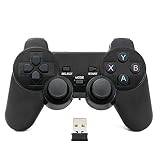
- Brand new and high quality.
- Wireless Game Controller for PC.
- 2.4GHz wireless.
- Powered by 2* AAA battery.
- This controller can't be used on the Raspberry Pi.
- Only one window is displayed at a time.
- Apps appear full screen whenever possible.
- Apps that do not support full-screen presentation may appear against a black background.
- Some keyboard shortcuts behave differently or are disabled.
- Minimize and maximize controls do not change window state in the same way they do on the normal desktop.
These restrictions are intentional: the mode prioritizes simple controller navigation over desktop multitasking. If you need several visible windows, ordinary desktop mode remains the better choice.
Why the handheld connection matters
The full-screen experience originally appeared in the context of the ROG Xbox Ally family, Windows 11 handhelds with Xbox-oriented controls and a dedicated Xbox button. Microsoft later expanded the experience to additional Windows handhelds and began previewing it on laptops, desktops, and tablets.
That history explains the design. A handheld benefits from a launcher that can be navigated from buttons and sticks, without requiring a mouse to find a small desktop icon. The broader rollout applies the same idea to a couch-connected laptop, a living-room desktop, or a touch tablet.
However, a laptop or desktop running Xbox mode does not become an Xbox console. Windows remains underneath the interface, and compatibility still varies by game, store, account, anti-cheat system, controller support, and hardware.
Best uses for Xbox mode
Living-room and couch gaming
If a PC is connected to a television, Xbox mode can reduce the need to keep a mouse and keyboard nearby during game selection. A controller-first launcher is useful when the PC is functioning more like a console than a workstation.
Handheld gaming
On supported handhelds, automatic entry at startup and reduced background activity are the most relevant documented advantages. The feature can make the device feel more focused when you want to turn it on and play, while still allowing a return to Windows for installing software or changing settings.
Mixed PC game libraries
The aggregated library can make it easier to find Xbox and Game Pass titles alongside installed games from supported PC storefronts. The exact storefront list and library behavior can change, and Microsoft does not promise that every store or every installed title will appear perfectly.
Rank #4

- Compatible with Windows and Android.
- 1000Hz Polling Rate (for 2.4G and wired connection)
- Hall Effect joysticks and Hall triggers. Wear-resistant metal joystick rings.
- Extra R4/L4 bumpers. Custom button mapping without using software. Turbo function.
- Refined bumpers and D-pad. Light but tactile.
Quickly returning to work
Because Xbox mode is not a separate operating system, you can leave it when you need the full Windows environment. That makes it more flexible than a dedicated console, though also less isolated: desktop notifications, updates, launchers, and Windows settings still exist underneath.
Do you need to buy a controller?
No. Microsoft presents Xbox mode as controller-optimized, not as a mode that universally requires a particular controller. Keyboard, touch, Game Bar, and Task View provide additional ways to enter or manage the experience.
Do these 3 things before closing this tab:
1Scan for outdated or missing drivers - takes under a minute2Repair Windows errors before they cause bigger problems3Fix the driver behind crashes, sound loss and screen glitchesFor the intended couch or handheld-style experience, a compatible controller is the most practical input device. An Xbox Wireless Controller for Windows PC supports wireless and Bluetooth connectivity on Windows 10 and Windows 11 PCs and can be configured with the Xbox Accessories app. Treat it as an optional accessory: if you already own a compatible controller, there is no reason to purchase another one merely to enable Xbox mode.
Troubleshooting: Xbox mode is missing or not working correctly
The Xbox mode setting is not present
- Check Settings > System > About and confirm that the PC is running Windows 11 version 24H2 or later.
- Install available Windows updates, including updates to the Xbox app from the Microsoft Store.
- Confirm that the feature is available in your market; the April 30 rollout was phased and market-limited.
- Do not assume that the general Xbox PC app requirement means Xbox mode is supported. The app and the mode have different Windows-version requirements.
The shortcut does nothing
- Confirm that Enable Xbox mode is switched on under Settings > Gaming > Xbox mode.
- Try entering it through Game Bar settings or Task View.
- If the feature is present but the shortcut conflicts with another utility, use the on-screen entry point instead.
A game or store does not appear
Xbox mode does not guarantee universal storefront or title detection. Check that the game is installed, its launcher is available, and the relevant account is signed in. Some games may still need to be opened through their original launcher, and unsupported apps may not display like full-screen games.
The controller, graphics, audio, or network connection behaves badly
Start with the normal, manufacturer-supported steps: reconnect or re-pair the controller, install Windows updates, update the game and its launcher, check the device manufacturer’s support page, and reinstall or roll back a recently changed driver when appropriate. Xbox mode itself is not a guarantee of higher frame rates or better hardware compatibility.
Optional driver troubleshooting: if the symptoms persist after those basic checks, some users may choose to check for outdated device drivers with a third-party driver utility. Such software can be useful for locating missing or incompatible drivers, including graphics, audio, network, chipset, and controller-related components, but it is not required to enable Xbox mode and should not be presented as a guaranteed FPS fix. Create a restore point where appropriate and prefer the PC or component manufacturer’s driver when there is a conflict.
The bottom line
Xbox mode makes Windows 11 more console-like without giving up the flexibility of a PC. It is most compelling for handhelds, TV-connected systems, and anyone who wants to browse a mixed PC library with a controller. It is less useful if you need conventional multitasking, and it does not solve game compatibility or turn Windows hardware into an Xbox console.
Best Value

- 【For PC & Steam Game Conosle 】Wireless gaming controller supports PC (Windows XP/7/8/8.1/10 /11), Steam PC gaming consoles.
- 【2.4G Wireless Transmission】2.4G Wireless Transmission Technology (with USB receiver) ensures a stable connection without any delay.
- 【Improved design】The classic new left and right shoulder button design is easy to use, has 12 function keys, Supports 2 controllers at the same time (requires game support)
- 【Vibration feedback 】PC wireless controller provides automatic vibration feedback to ensure riveting gameplay every time to enhance the game experience.
- 【High-performance chip 】The PC controller uses a high-performance chip, which has good stability and zero game delay.
For eligible users, the practical test is simple: update to Windows 11 24H2 or later, enable the feature under Settings > Gaming > Xbox mode, and try Win + F11. If the setting is not available, the phased rollout or market availability—not necessarily a fault with the PC—may be the reason.
Frequently Asked Questions
Does Xbox mode replace the Windows desktop?
No. Xbox mode is an optional interface within Windows 11. You can exit with Win + F11, Game Bar, or Task View and return to the regular desktop without rebooting.
Can Xbox mode run on Windows 10?
No. Xbox mode itself requires Windows 11 version 24H2 or later. The Xbox PC app supports some Windows 10 installations, but that broader app requirement does not apply to Xbox mode.
Recommended Free Tools
Can Xbox mode launch games from different PC stores?
Microsoft says the library can include Xbox and Game Pass content plus installed games from leading or popular PC storefronts. It does not guarantee support for every store, launcher, or game.
Do I need an Xbox controller to use Xbox mode?
A controller is recommended for the intended experience, but it is not presented as a universal requirement. Keyboard, touch, Game Bar, and Task View provide other controls and entry points.
Why can’t I see the Xbox mode setting?
Xbox mode requires Windows 11 24H2 or later, and the rollout is limited to supported markets and is being delivered in phases. A compatible PC may not receive it immediately.
The Bottom Line
Xbox mode is an optional, controller-first gaming shell for Windows 11 24H2 and later. It brings games and supported apps into a console-style interface on compatible PCs and handhelds, but it does not replace the desktop, guarantee universal storefront support, or turn a PC into an Xbox console.
The Tool Desk
Outbyte PC Repair FREEClear out junk files and repair common Windows errorsFree Scan →Outbyte Driver Updater FREEFix the driver behind crashes, sound loss and screen glitchesFind Drivers →Quick Recap
Product prices and availability are accurate as of the date/time indicated and are subject to change. Any price and availability information displayed on Amazon at the time of purchase will apply.

