The Tool Desk
Outbyte Driver Updater FREEFix the driver behind crashes, sound loss and screen glitchesFind Drivers →Outbyte PC Repair FREEClear out junk files and repair common Windows errorsFree Scan →Yes. The PS3 can output 480p in NTSC regions when connected through HDMI, component/D-Terminal, or a compatible AV MULTI/SCART setup. Composite and S-Video are limited to 480i in Sony’s NTSC table. To use 480p, select the connector you have connected and enable resolutions your TV supports in the PS3’s video-output settings.
Which PS3 connections support 480p?
Sony’s video-output guide lists the supported modes by region and connection. These are system output capabilities; they do not mean every game renders natively at every listed resolution.
| Connection | NTSC modes listed by Sony | PAL modes listed by Sony |
|---|---|---|
| HDMI | 1080p, 1080i, 720p, 480p | 1080p, 1080i, 720p, 576p |
| Component/D-Terminal | 1080p, 1080i, 720p, 480p, 480i | 1080p, 1080i, 720p, 576p, 576i |
| Composite/S-Video | 480i | 576i |
| AV MULTI/SCART | 480p, 480i | 576p, 576i |
Source for the listed modes: Sony’s PS3 Video Output Settings guide. The displayed options can vary according to the region where the console was purchased. The CECH-4301C manual also lists 480p among that model’s AV output resolutions, but that model-specific detail is not a guarantee about every game or setup: Sony CECH-4301C system manual.
How to enable 480p on a PS3
- Connect the PS3 to the TV using a 480p-capable connection, such as HDMI or compatible component video.
- On the PS3 XMB, open Settings > Display Settings > Video Output Settings.
- Select the connector actually in use.
- Select the resolutions supported by your TV, including 480p if it is offered, then confirm the picture on screen.
For HDMI, Sony provides an automatic resolution adjustment option when the HDMI device is on. The system outputs the highest resolution available for the content from among the resolutions selected. The HDMI cable is sold separately; Sony’s guide does not require a special PS3-branded cable. A functioning cable and compatible TV input are necessary, but the cable alone does not select 480p.
What’s actually slowing this PC down?
Pick the symptom - the matching free tool is one click away.
#1 Best Overall

- Wide Compatibility with PlayStation Consoles--Compatible with Sony PlayStation 1, PS2, PS2 Slim and PS3 game consoles, this 6ft RCA composite AV cable connects your PlayStation console directly to any TV or monitor with RCA composite inputs. It is a perfect replacement or backup cord for your original lost or damaged PlayStation AV cable.
- Plug-and-Play Audio Video Transmission--This 1.8M/6ft audio video cable transmits both stereo audio and composite video via 3 color-coded RCA connectors (yellow for video, red/white for left/right audio). No extra drivers or adapters are needed — simply plug and play for instant classic gaming.
- Stable & Clear Retro Gaming Performance--Delivers stable composite video signal and crisp stereo sound for PS1/PS2/PS3 classic games, restoring the original retro gaming experience. Tinned copper conductors and durable shielding minimize signal loss and interference for consistent, lag-free performance.
- Durable Replacement for Original Cords--Ideal for replacing lost, broken or damaged original PlayStation AV cables. The flexible PVC jacket and reinforced connector joints withstand frequent plugging and long-term use, making it a reliable spare for home or travel use.
- Compatibility Reminder--This is a 3-connector RCA composite AV cable for PS1/PS2/PS3. Please ensure your display has red/yellow/white RCA composite ports before purchase; it is not compatible with 5-port component video inputs. If your device only has an HDMI port, you’ll need an RCA to HDMI converter (not included)!!!
Why the TV or game may not show 480p
- Composite cable: Sony lists composite/S-Video as 480i only in NTSC regions, so the supplied composite cable will not provide 480p.
- Wrong connector selection: The video-output setup must match the physical connection in use.
- TV input limitations: The television must support the selected mode on that input. Check its input specifications if 480p is unavailable or the picture is not displayed.
- Region: Sony’s PAL listings use 576p/576i rather than 480p/480i; available options depend in part on the console’s region.
- Individual game behavior: The connector table does not establish which resolution any particular PS3 title renders or outputs. Consult the game’s documentation for title-specific information.
What to do if the picture goes blank
Sony warns that an incompatible output selection can temporarily blank the display. Wait for the settings to revert. If the picture does not return, follow the restart procedure in Sony’s video-output guide. Avoid confirming a mode you cannot see on the TV.
Independent reader supportYour contribution helps us test, update, and keep practical guides available for everyone.480p output is different from PS1/PS2 upscaling
The 480p option in Video Output Settings concerns the PS3’s output mode. PS/PS2 upscaling is a separate Game Settings option that can display legacy software at an HD resolution such as 720p, 1080i, or 1080p when the display, connection, and output settings support it. Sony advises turning upscaling off if the image quality is reduced or does not look right, and notes that some PlayStation and PlayStation 2 software may behave differently or may not work properly on PS3. See Sony’s PS/PS2 upscaler guide.
Quick Recap
Best Value

- Audio Video cable displays crystal clear picture on your TV for all of your video game needs
- Connect to your HDTV (High-Definition TV) or EDTV (Enhanced-Definition TV) and enjoy the most stunning graphics available from your PS3 via 480p / 1080i /720p resolution
- Analog AV Multi Out Port to component inputs on NTSC-compatible TVs
- Supports 2-channel stereo audio,Dock connector plugs directly into the game console.
- Good material: the cable is copper wire coated with ultra thick and flexible PVC jacket with colour coded connectors, can help you to install the cable much easier
Rank #4
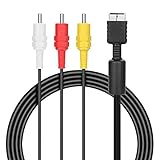
- ★Cable length★ 2.5 m / 8 ft, standard AV composite lead, Each Cable is equipped with standard AV composite lead, yellow, red & white connectors on one side and input connector for Playstation game console on the other side.
- ★Safe and Durable★High quality copper wire inside for optimal signal clarity to guarantee no lag during your gaming time. The copper pins connector heads slot in easily and steadily, and won't get loose or fall out of your devices. Premium PVC housing, flexible and tangle free.
- ★Product Compatibility★Compatible with PlayStation 1, PlayStation 2 and PlayStation 3.
- ★Easy to Use★Just plug this AV cable into the PlayStation and plug it into the appropriate input on your TV. Output at standard resolution.
- ★100% Satisfaction★:60 days no reason to return and exchange goods.Content:1 X Cable.You can give it as a gift to your family, friends, classmates and anyone, especially your children.
Rank #3

- This PS2/PS3 Component cable, we can use AV signal and Component signal output to ensure more stable signal transmission and clearer picture.
- For TV connection side, there are 6 outputs multi out ports, they are: Video, Component Y/Pr/Pb, Audio L channel, Audio R channel. The component multi-out AV cable is compatible with PlayStation PS2 & PS3 & PS3 Slim gaming console.
- Set your TV to "Component" or "AV" as the input signal. This PS2 PS3 Component AV cable should be connected to the Component / AV input port of your TV correspondingly. Component--Video: Blue-Green-Red;Aduio: Red & White. AV--Video: Yellow; Audio--Red & White.
- High Resolution: Supports high resolution of 480P, 720P, 1080P. This Component cable provides clearer video and sound for your PS2/PS3 console, greatly enhancing the gaming experience.
- Material: The PS2 PS3 Component AV Cable is made of full copper, plus PVC mesh sheath, durable and not easy to damage, 1.8m long cable is more convenient to use.
Rank #2

- Get the best analog video & audio out of your PS2 or PS3 using this high-quality fully shielded cable
- HD Retrovision cables are properly engineered and constructed; don't settle for cheap unshielded cables which result in poor video quality and audio interference issues
- Supports all available PS2 & PS3 YPbPr video resolutions up to and including 1080p (see product description below)
- Full coverage 360° shielding prevents audio and video crosstalk (click on photos for more details)
- Proper 75Ω (75 ohm) coaxial cable impedance for optimal video quality (click on photos for more details)
Product prices and availability are accurate as of the date/time indicated and are subject to change. Any price and availability information displayed on Amazon at the time of purchase will apply.




