Free tools Windows power users keep installed
One-click scans. No signup required.
For a reliable F1 25 wheel setup, first confirm that your exact wheel is supported on your platform, then check its control bindings, calibrate steering and pedals only where needed, and tune force feedback for your hardware. There is no evidence-backed universal setting that is fastest: supported-device presets and vendor recommendations differ, and the sources cited here do not report controlled lap-time tests.
Wheel setup is not car setup
Wheel setup configures your physical hardware and its in-game inputs: steering, pedals, buttons, vibration, and force feedback. Car setup changes the simulated vehicle, including its aerodynamic balance and suspension. Keep those adjustments separate so a change to how the wheel feels is not mistaken for a change to how the car behaves.
Confirm your wheel is supported on your platform
Check EA’s current F1 25 supported controllers, wheels, and VR headsets list before buying or troubleshooting. Compatibility is platform-specific: EA lists the Logitech G29 for PlayStation 5 and PC, but that does not establish support for Xbox Series X|S. Check the Xbox list separately rather than assuming support carries across platforms.
EA also lists default in-game presets for selected rim-swap-capable PC wheelbases. Where a preset is available for your exact hardware, it can provide an initial button mapping and force-feedback configuration without requiring you to build one from scratch. A preset is a starting point, not proof that every control is assigned the way you want.
#1 Best Overall

- RACE WITH REAL-TIME DATA - The built-in 4.3 inch IPS LCD display shows up to 69 critical telemetry items with dynamic skins that adapt to your game, giving you the same cockpit awareness as professional drivers so you can make faster, smarter decisions every lap in your sim racing setup.
- CARBON FIBER BUILT FOR SPEED - A genuine 21 layer carbon fiber faceplate delivers the perfect balance of rigidity and lightweight feel, ensuring every ounce of Force Feedback reaches your hands without distortion, so your formula wheel feels as responsive and precise as the real Ferrari SF1000 race car replica it was modeled after.
- TOTAL COMMAND AT YOUR FINGERTIPS - With up to 25 fully programmable action buttons including 7 rotary encoders, you gain unlimited configuration possibilities for every racing simulator scenario, letting you fine tune brake bias, differential, and engine modes without ever taking your eyes off the track or losing precious time.
- IMMERSIVE OFFICIALLY LICENSED DESIGN - Officially licensed by Ferrari with iconic labeling and authentic markings, this steering wheel delivers unrivaled realism whether connected natively or via wireless telemetry, transforming your sim racing cockpit into a true Formula One experience that looks and feels absolutely spectacular.
- PREMIUM MAGNETIC PADDLE SHIFTERS - Swap between the included 100% aluminum interchangeable magnetic paddle shifters for lightning quick gear changes, plus two customizable analog paddle shifters give you extra control for clutch biting points and advanced driving techniques on your racing wheel and pedals setup.
Set up the wheel in F1 25
- Connect the wheel and select its control scheme. Open the relevant control scheme in F1 25 and confirm the game recognizes your wheel.
- Check steering, pedals, and buttons. Test each input and verify that important controls are assigned to usable buttons. EA’s F1 25 Accessibility Resources cover input remapping and MFD shortcuts.
- Calibrate steering, throttle, and brake individually. F1 25 provides deadzone and sensitivity calibration for each. Adjust a value when you can identify a specific problem—for example, an input registering while the control is at rest or failing to reach its expected range. EA’s documentation does not prescribe universal deadzone or sensitivity values.
- Set vibration and force feedback. Enable or adjust them to suit your hardware and preference. If EA supplies a default preset for your wheelbase, start there; on PC, check whether the wheelbase manufacturer also offers an F1 25 profile.
- Make small changes and evaluate them on track. Change one or two values at a time and note both the symptom and adjustment. Treat a change as a preference unless you have measured its performance; do not assume it improves lap times.
Tune force feedback for the wheelbase
Force-feedback settings are hardware-specific. EA’s PC preset list covers selected Fanatec, Moza, SIMAGIC, and Thrustmaster wheelbase families, but the official EA materials do not specify a numeric optimum that applies across brands.
Asetek’s EA F1 25/26: RaceHub and Game Setup illustrates why copying figures between wheelbases can mislead. For six Asetek torque classes spanning 5.5 Nm to 27 Nm, its recommendations list force-feedback strength from 36% to 80%, on-track effects from 25% to 36%, rumble-strip effects at 40%, and maximum wheel rotation at 360° for all six classes. Those are Asetek-specific starting recommendations, not a universal F1 25 prescription.
Rank #2

- Official life-size replica of the steering wheel from the Ferrari SF-25 race car
- Interactive 4.3-inch / 109-mm IPS LCD display and 21 LEDs to display race information
- 25 action buttons and 7 encoders with authentic markings
- 100% carbon fiber faceplate: rigid and lightweight
- Super-responsive T-Chrono Paddles push/pull paddle shifters, plus customizable analog paddle shifters
Asetek says: “While these presets and settings are a great starting point, adjusting and tweaking the settings to your personal preference can make a big difference and is exactly what RaceHub is for.” This is vendor advice for its own software and wheelbases, not independent comparative testing. Use recommendations for your hardware as a baseline, then adjust to address a clear issue or preference.
Independent reader supportYour contribution helps us test, update, and keep practical guides available for everyone.Keep vehicle adjustments in their own workflow
EA’s September 18, 2026 article on the F1 25: 2026 Season Edition discusses vehicle setup, not wheel calibration. It recommends changing one or two vehicle settings before evaluating the effect, identifies aerodynamics as a high-impact balance adjustment, and describes anti-roll bars and springs as further controls. These are simulated-car changes; they do not calibrate your wheel or establish a force-feedback setting.
Rank #3

- Collector’s item. Detachable Ferrari 150th Italia racing wheel replica for the Thrustmaster T300RS (PS3 & PS4); T500RS (PS3, PS4, Xbox One & PC); and TX Wheel (Xbox One & PC), all sold separately
- A precise, robust and realistic racing wheel
- Full-size replica of the Formula 1 Ferrari 2011 racing wheel, under official license by Ferrari
- Reinforced scratched-brushed metal face is heavier and more solid compared to plastic, ensuring optimum stability and inertia
- Rubber-textured wheel offering a realistic and comfortable grip
The article’s ERS Activation Mode advice—changing Toggle to Hold—is specific to that 2026 guidance. EA states that the 2026 content discussed is not in the base game and requires the Season Edition or Season Pack. Do not treat that edition-specific gameplay advice as a general wheel setup requirement.
Quick Recap
Best Value
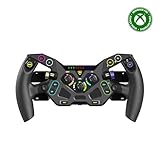
- Ultra-Realistic Formula Racing Layout and Ergonomics
- 10 Mechanical Switches with RGB Lighting for Authentic, True-to-Life Control
- Durable, Aluminum Chassis with Rubberized Materials for a Non-Slip Grip
- Glide through Gears with Magnetic Paddle Shifters
- Tunable Clutch Paddles for Lightning-Fast Launches & Quicker Shifts
Rank #4

- Immersive Gaming Experience: Perfect for PlayStation 5, PS4 and PC gaming titles, the Driving Force simulates the feeling of driving a real car with precision steering and pressure-sensitive pedals
- Premium Control: The Driving Force feedback racing wheel provides a detailed simulation of driving a real car, with helical gearing delivering smooth, quiet steering and a hand-stitched leather cover
- Customizable Pedals: These pressure-sensitive nonlinear brake pedals provide a responsive, accurate braking feel on a sturdy base - with adjustable pedal faces for finer control
- 900-Degree Rotation: Lock-to-lock rotation of the Driving Force means you can turn the wheel around two and a half times, hand over hand on wide turns - just like a real F1 race car
- Up Your Game: Take your racing simulation to the next level with Driving Force accessories like the Driving Force Shifter or desk and rig mounts
Product prices and availability are accurate as of the date/time indicated and are subject to change. Any price and availability information displayed on Amazon at the time of purchase will apply.




