“Login Failed” on Xbox means Fortnite could not complete sign-in. Epic Games Support does not name one confirmed cause for the message. Its dedicated troubleshooting article instead lays out an ordered sequence covering the Xbox cache and the running game, the home network and DNS, the Xbox profile, and, only as a later step, a console reset or escalation to Xbox Support. Check for an outage first, then work through the steps in order and stop once the error clears.
What the message does and does not tell you
Epic’s support article for this exact error, titled “‘Login Failed’ error when logging in to Fortnite on Xbox,” does not diagnose each occurrence. It lists actions grouped into four areas: the console’s cache and the running game, the home network and DNS, the Xbox profile, and a console reset with support as the final stop. Epic presents these as its recommended troubleshooting steps. It does not say that each one works for every player, and the article does not rank which cause is most common. Treat the sequence as a process of elimination, not a diagnosis.
| # | Preview | Product | Price | |
|---|---|---|---|---|
| 1 |
|
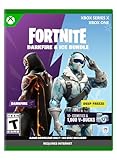
FORTNITE - Darkfire & Ice Bundle - Xbox Series X (Code in Box) | $19.99 | Buy on Amazon |
| 2 |

|
FORTNITE | Darkfire & Ice Bundle | XBOX Digital Code | $29.99 | Buy on Amazon |
| 3 |

|
Fortnite Minty Legends Pack - (Xbox Series X) | $56.60 | Buy on Amazon |
| 4 |

|
Fortnite - Xbox One | $59.99 | Buy on Amazon |
Check for an outage before changing settings
Changing settings is pointless if the login service itself is down, so rule out an outage first. Epic’s guidance on what to do when its servers are down points to three checks:
- Epic Games Public Statuses page. Epic says players can use it to see whether a server is down or under maintenance. If no restoration time is listed, keep monitoring the page.
- Your internet service provider. Ask whether there are local outages or degraded service in your area.
- Xbox network troubleshooting. If neither the status page nor your provider reports a problem, Epic directs you to Xbox’s network troubleshooting tools.
Epic’s wording on the status page reads: “You can check the Epic Games Public Statuses to see if a server is down or under maintenance and when it will be back online.” The page is attributed to Epic Games Support, and the cited support pages name no individual speaker.
The Tool Desk
Outbyte Driver Updater FREEScan for outdated or missing drivers - takes under a minuteDriver Scan →Outbyte PC Repair FREEClear out junk files and repair common Windows errorsFree Scan →#1 Best Overall
- Darkfire Bundle: Including 3 outfits (with LEGO Styles) and back blings; Dark Power Chord, Dark Six String, Molten Omen, Molten Battle Shroud, Shadow Ark, Shadow Ark Wings, plus 3 wraps, 3 dual-wielding pickaxes, and an emote!
- Deep Freeze Bundle: Cool off with the Deep Freeze set and 1,000 V-Bucks. Includes the frostbite outfit (with LEGO Style), freezing point back bling, chill-axe pickaxe, and cold front glider.
- The Fortnite – Darkfire & Ice Bundle includes 10+ cosmetics and 1,000 V-Bucks!
Troubleshooting steps, in Epic’s order
Follow these in sequence and stop as soon as the error clears.
- Clear the Xbox cache. Epic links to its instructions for clearing the cache on Xbox Series S|X consoles.
- Fully quit and relaunch Fortnite. Leave the game for the Xbox dashboard, select Fortnite, open the controller Menu, and choose Quit. Then launch Fortnite again.
- Restart the modem and router.
- Switch the DNS the Xbox uses. Follow the public-DNS instructions Epic links to from its article.
- Remove and re-add the Xbox profile.
- Reset the console only if the steps above fail. Epic points to Xbox Support’s instructions for the Reset and keep my games & apps option. Epic does not state that a reset will resolve the error, and this step should come after everything else.
- Contact Xbox Support if the error persists.
Reading the status snapshot correctly
A recent search result for Epic’s Public Statuses page showed Fortnite and Login as Operational. That is a single point-in-time reading. It does not guarantee that a later sign-in attempt will succeed, and it says nothing about the status of Xbox network services. Check both Epic’s status page and Xbox’s status at the moment the error appears.
Rank #2
- DARKFIRE & ICE BUNDLE — Expand your Fortnite locker with 10+ cosmetics from the Darkfire and Deep Freeze sets, plus 1,000 V-Bucks.
- DARKFIRE BUNDLE — Includes Dark Power Chord, Molten Omen, and Shadow Ark outfits with LEGO Styles, along with Dark Six String, Molten Battle Shroud, and Shadow Ark Wings back blings.
- MORE DARKFIRE GEAR — Customize your loadout with three wraps, three dual-wielding pickaxes, and an emote included in the Darkfire Bundle.
- DEEP FREEZE BUNDLE — Cool off with the Frostbite outfit with LEGO Style, Freezing Point back bling, Chill-Axe pickaxe, and Cold Front glider.
- 1,000 V-BUCKS — Get 1,000 V-Bucks with the Deep Freeze Bundle to use in Fortnite.
What this guidance does not establish
- No frequency, prevalence or success rate is published for this error or for any of the steps above.
- No independent testing of the steps is cited. The sequence reflects Epic’s recommendations.
- Epic’s article for the error and its outage guidance page show no publication date, so the steps should be read as current guidance without a fixed revision date.
- The source does not explain the technical mechanism behind the message, so the steps cannot be matched to a specific underlying fault.
The practical takeaway for a player is simple: confirm the service is up, then move through the steps in order without skipping ahead to a console reset.
Source references: Epic Games Support, “‘Login Failed’ error when logging in to Fortnite on Xbox”; Epic Games Support, “When the Epic Games servers are down, how can I find out when they’ll be back up?”; Epic Games, “Epic Games Public Status.”
Quick wins for a faster PC:
Fix the driver behind crashes, sound loss and screen glitchesFind Drivers →Clear out junk files and repair common Windows errorsFree Scan →Quick Recap
Rank #4
- Heroes - play as four hero classes, each with thousands of variations to recruit and unlock.
- Skill tree/RPG - points put into the skill tree allow you to unlock new hero abilities, upgrade weapons, Boost your team health, and more.
- Enemies - defend yourself against hordes of monsters that come from the mysterious Storm.
- Building System - The revolutionary building system allows you to quickly build structures while also juggling frenetic combat.
- Schematics/Crafting - Use the resources you find in the world to craft weapons, traps, health packs, and more.
Rank #3
- Improve your chill with this pack of cosmetic fun
- 3 NEW cool complete Minty Outfits for your character
- 3 NEW Back Blings
- 3 NEW Pickaxes
- 1 spicy hot Wrap.1000 V Bucks to help you complete the perfect outfit
Product prices and availability are accurate as of the date/time indicated and are subject to change. Any price and availability information displayed on Amazon at the time of purchase will apply.




