Players have reported League of Legends returning them from champion select to the home screen with the message “you were removed from the party,” including players who say they were queued solo. Community posts from 2021 through 2025 describe the same symptom across ranked, ARAM, Arena, and TFT (Teamfight Tactics). None of the material we reviewed establishes a cause, and we could not find a Riot Games explanation or a lasting fix.
What the message says
The in-client notice reads “you were removed from the party” and, in some reports, “Sorry, you were removed from the party.” Those are the wordings players quote, and they are the wordings to search for if you want to find related discussions.
The phrase implies that a party leader removed you. Several reports, however, describe players who believed they were solo, so the text alone does not show a deliberate removal. Treat the wording as the interface message players saw, not as an explanation of what caused it.
What players reported, by source
February 2021: the original r/leagueoflegends thread
The original post describes the message appearing during champion select, sending the player back to the home screen while they were solo. The poster asked whether anyone else had seen it. Other commenters said they had similar experiences, but none of them verified a cause.
Quick wins for a faster PC:
Fix the driver behind crashes, sound loss and screen glitchesFind Drivers →Repair Windows errors before they cause bigger problemsFix Now →Scan for outdated or missing drivers - takes under a minuteDriver Scan →#1 Best Overall

- The epic battles and Champions of League of Legends come to life with the limited edition LoL A30 headset.
- Matte black finish and bronze accents, LoL and Riot Games tags, plus a collectors box with artwork inspired by the game, make this the must-have headset experience for serious players and fans alike.
- The included mobile cable and reliable A30 cross-platform compatibility ensure seamless communication - critical for executing team strategy from your PC, laptop or mobile device.
- Breathable Fabric Cushions
- Unidirectional Mic to help isolate voice communication
July 2025: a later thread across queue types
A July 2025 thread collects reports from ranked, ARAM, Arena, and other queues. Commenters mention several regions, but the posts do not name them consistently. Some commenters speculate that loading trouble or Vanguard initialization is involved. These are player hypotheses, not explanations from Riot, and they are not confirmed by any official statement we could find.
League PBE discussion: Arena and TFT
A discussion on the League Public Beta Environment (PBE) describes related reports in Arena and TFT. Some users said that restarting, patching, or retrying seemed to help for a time. Other posts describe the problem coming back, so the temporary relief should not be read as a fix.
Rank #2
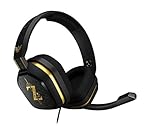
- The A10’s durable aluminum headband with damage-resistant rubberized cover and detachable cable system is designed to withstand wins, losses, and everything in between.
- Tuned for Gaming, ASTRO Audio was developed with pro gamers and game designers to deliver clarity and detail at every frequency and volume level.
- Featuring over-the-ear construction with premium ear cushions and headband, these lightweight ASTROs lower fatigue and extend the duration of any gaming session.
- Crystal clear communication and easy flip-to-mute action puts you in control of your voice com.
- The A10 connects to any audio source with a 3.5 millimeter jack – perfect for console controllers and most PCs and Macs.
March 2025: the bug megathread
The March 2025 bug megathread includes reports of the message after champion select and after queueing, from several regions and modes. Some posters include reproduction steps. Those steps are individual user claims. They are not measured failure rates, and they do not show how often the message appears.
How the reports compare
The table below puts the four sources side by side. Where a source does not give a detail, the cell says so rather than filling it in from another post.
What’s actually slowing this PC down?
Pick the symptom - the matching free tool is one click away.
Rank #3

- 🖥️ Reduce Eye Strain & Improve Sleep: Our blue light blocking glasses help reduce harmful blue light emitted by digital screens. These blue light glasses are ideal computer glasses for daily screen use, scientifically designed to limit exposure that disrupts melatonin production and circadian rhythm.
- 🔶 Patented PLASMA Technology (Amber Tint): High-performance gaming glasses that filter 100% of blue light from 380–400 nm and 86% across 380–450 nm, plus full UV400 protection. These blue light glasses provide maximum visual safety for long screen sessions, while the amber tint enhances screen contrast for sharper, more comfortable vision.
- 💎 Professional Quality & Ultra-Light Comfort: lenses with anti-reflective coatings, UV400 protection, and an ultra-light 27 g polycarbonate frame designed for comfort under any gaming headset. Soft nose pads. FDA impact-resistance compliant (21 CFR 801.410, tested per ANSI Z80.3)
- ✨ Complete Package: Includes 1 pair of blue light glasses (unisex), 1 lightweight microfiber pouch, and 1 microfiber cleaning cloth made from 80% recycled material (190 g quality). A complete kit to protect and maintain your blue light blocking glasses, whether used as computer glasses or gaming glasses.
- 🇫🇷 Designed for Gamers: Professional French brand specializing in eSports & Gaming, trusted by over 500,000 gamers worldwide. Built to last with patented technologies and a lifetime warranty, these high-performance blue light glasses men and blue light glasses for woman are engineered to protect your eyes and elevate your focus and performance.
| Source | Date | Point in the flow | Modes reported | Regions reported | Proposed explanations | Reported workarounds |
|---|---|---|---|---|---|---|
| Original r/leagueoflegends thread | February 2021 | During champion select; player was solo | Not stated | Not stated | None verified | Not stated |
| Later r/leagueoflegends thread | July 2025 | Reported after queueing | Ranked, ARAM, Arena, other queues | Several, not named consistently | Loading trouble and Vanguard initialization (unverified player hypotheses) | Not stated |
| League PBE discussion | Not stated | Not stated | Arena, TFT | Not stated | None verified | Restarting, patching, or retrying; some said it helped temporarily, others reported recurrence |
| Bug megathread | March 2025 | After champion select and after queueing | Several modes | Several regions | None verified | Not stated |
Two patterns recur. The reports cluster around matchmaking and champion select, and the message appears in more than one mode. Neither pattern identifies a cause.
What is and is not established
- Established by the reports: the message has appeared to players queued solo, during matchmaking and champion select, across several modes and regions.
- Established by the reports: the same symptom has been described in posts spanning 2021 to 2025.
- Not established: a single technical cause, or that all occurrences share one cause.
- Not established: that the message means a deliberate removal by a party leader.
- Not established: that loading trouble or Vanguard is involved.
- Not established: how often the message occurs. Individual reproduction reports are not population statistics.
- Not established: that any restart, patch, or retry reliably prevents it.
General steps if it happens to you
These are low-risk general troubleshooting suggestions drawn from what players reported. They are not a verified fix, and nothing in the material shows that they resolve the message. None of them requires new hardware.
Rank #4

- Dongle Receiver Adaper For Logitech G733 Lightspeed Wireless Gaming Headset Before 2023 editon
- Only for G733 headset 1st Gen editon, like the picture show, Not universal, Not for G733 2st Gen or G pro x Wireless another headset
- Please carefully distinguish your headphone version based on the reference image. The second and first generations cannot be distinguished by the appearance and packaging of the phone, but their receivers are not interchangeable.
- !!!! Ensure your headset editon is very important before place order.
- Write down when it happened: before the queue pops, during champion select, or after a previous game. Those timing details are the most useful thing to report.
- Note the queue or mode, your region, and whether you were in a party at all. If you were solo, record that explicitly.
- Fully close the League client and relaunch it. If it will not relaunch cleanly, restart the computer.
- If a client update or patch was pending, let it finish before queueing again.
- Check Riot’s official service status and Riot Support for any active incident before changing settings or files.
- If the message recurs, contact Riot Support with the timestamp, mode, region, and the exact wording shown.
Current status and limits
The newest community reports we found date from July 2025, and the oldest from February 2021. We found no Riot-confirmed cause and no current incident status for the message. That means we cannot say whether it is active or resolved as of October 2026. Check Riot’s official channels before assuming either.
This article draws on community posts and forum discussions, not on hands-on testing or personal experience with the client.
Outdated Drivers Are Slowing You Down
One free scan finds every outdated or missing driver and matches the right update for your exact hardware.Free scan · exact hardware matchWindows Errors? Fix Them Before They Spread
Repair common Windows errors and clear accumulated junk for a smoother, more stable PC - no reinstall needed.Free scan · no reinstallQuick Recap
Product prices and availability are accurate as of the date/time indicated and are subject to change. Any price and availability information displayed on Amazon at the time of purchase will apply.




